- A* version: 5.4.5
- Unity version: 2022.3.62f
I have a layered gridgraph and a game where you can build in multiple floors.
Whenever something is put down I use the bounds to do a graph update to scan the new area.
AstarPath.active.UpdateGraphs( GetExpandedWorldBounds( extendNodes ) );
Here’s the scenario:
- put a tower → 4 nodes on top of the tower appear correctly - everything works
- remove the tower → 4 nodes disappear
- put the tower back in exactly the same spot → 4 nodes come back but the connections are wrong
- most connections from the new nodes are gone, sometimes (not always!) the connections between the new nodes, sometimes from new to existing nodes
- if i remove again, and then add again, then different set of connections are wrong
- I can re-update the bounds and it stays wrong
- the nodes get processed, but the connections stay wrong
- even doing a very wide area around the location doesn’t fix it
Visualized:
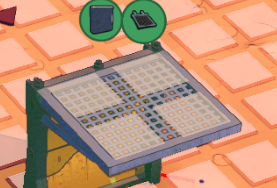
I just added, removed & readded the same platform twice.
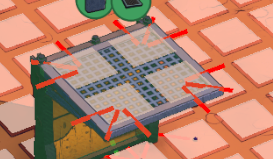
I visualize the node (white plane) and unavailable connections (red line).
[1] First time: 4 nodes, no red connections.
[2] Second time: red connections added for the non-existing nodes. I have not figured out how yet but the grid api returns different data. I suspect there might be some node records present for the non-existing nodes now.
[3] Third time: different connections are bad, now effectively my agent cannot move across those nodes anymore.
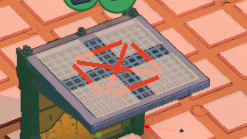
If I keep removing and adding, i loop between 2 and 3 all the time. Connections are inversed?
The only thing that fixes it is doing a full scan on the graph. Then everything is as expected.
Is it possible some residual info is kept somewhere that is only cleared on a full rescan?

