Integrating A* in a turn based game various questions

  • A* version: 5.4.4
  • Unity version: 6000.2.6f2

Hello and thank you for your tool it has been very helpfull, I am currently integrating it to my turn based RPG instead of my previous pathfinding, so far I have been able to do most of the things that I wanted but I might have taken some wrong direction.

I use a Layered Grid Graph
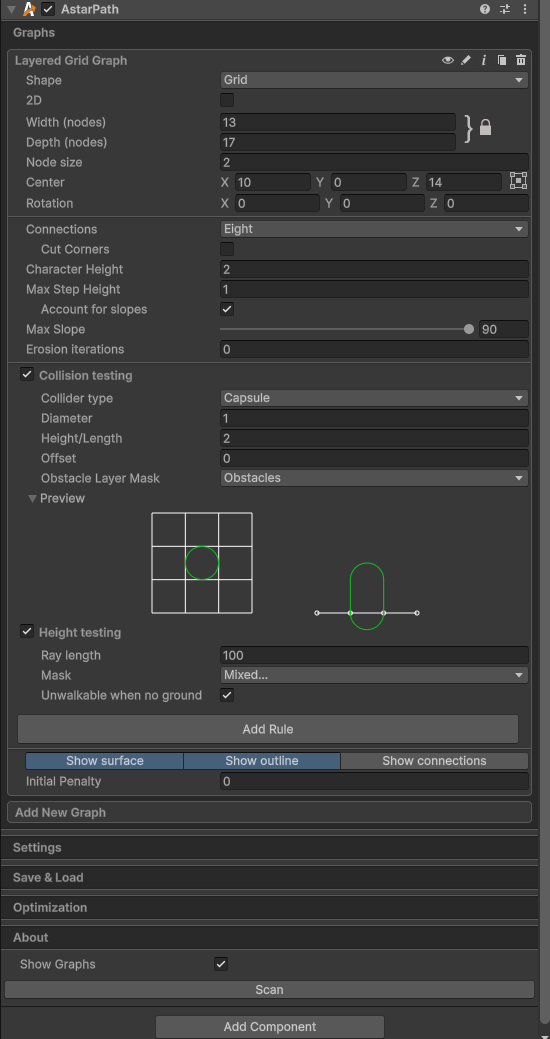
But I am not sure for the collision testing height see below.

And for my agents I use a Follower Entity
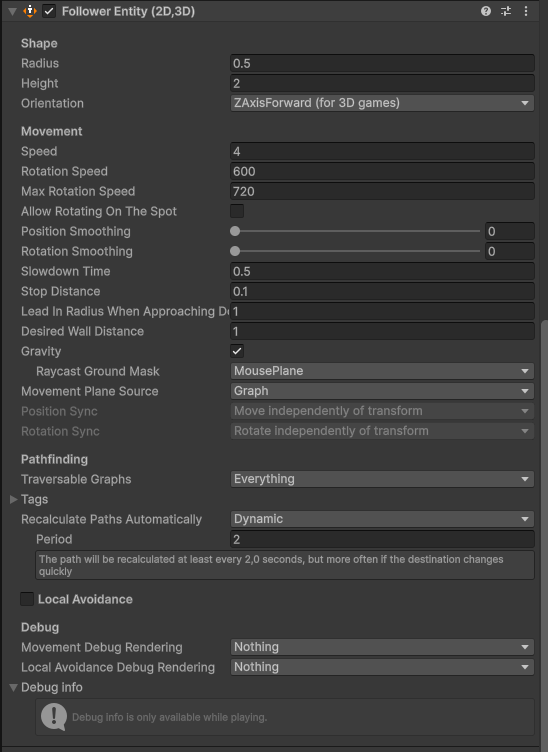
The Layered Grid Graph and my “Game” Grid are inline, I just have an offset of 1 has A* is managing the wall border of the map.
I tricked the graph like this for the map it is not the best example of inline but it is working.
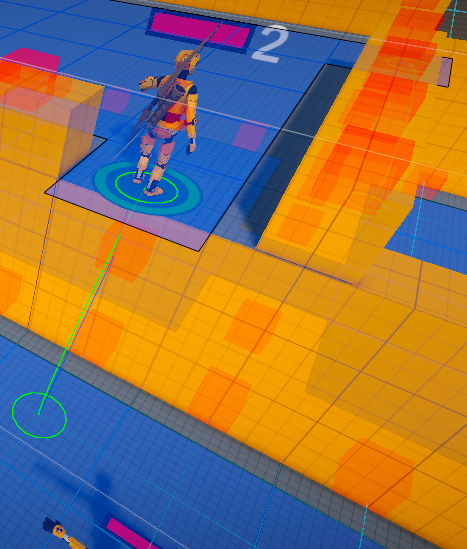
For reference the wall unit size is 3 and the model close to 2.

I can use the TraversalLink and I have integrated it with animations, I have a small problem on ladder when going down but I think it is due to the cubic Bezier curve.

The yellow part are obstacles layer, the grey plane are for mouseplane layer, I have decrease the collider of the wall below the link to 2 so I have the height difference of 1 which allow to have it working but maybe there is better solution? Or better settings I am kind of new to the tool :slight_smile:

Thanks to your tool I am able to have ramps now which is cool.

For Movement I am using a ConstantPath for the reachable position and a ABPath to get to it, I use a custom TraversalPovider:

public class MyCustomTraversalProvider : ITraversalProvider
{
    public bool CanTraverse(ref TraversalConstraint traversalConstraint, GraphNode node)
    {
        return true;
    }

    public bool CanTraverse(ref TraversalConstraint traversalConstraint, GraphNode from, GraphNode to)
    {
        if (to.Tag == 31) return false;

        return CanTraverse(ref traversalConstraint, to);
    }

But sometimes if an agent need to pass close to another one, there is some “blocking” until it finally manage to leave the tagged area it happens on some direction like having to pass by a small corner like this.
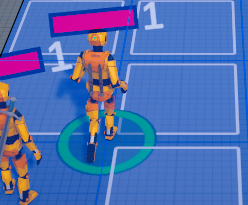
But it might be due to my traversal provider, do I need to setup the from as well? Or filter the from with any tag?

For calculating range, I need to test all positions in a cube (in case of different floors, like the case from top) and I can cycle all positions in range and floor no problem, but I would like to find the NodeInGridIndex or test if it is available, so I can continue. I tried to find something like InvalidNodeIndex but I don’t know much how it works or if it is relevant.

In this case I am a bit struggling, I could use the GetNode(x, z, layer) but looking directly in nodes seems quicker, I am a bit stuck here.

I am using GetNearest in case of player click but in this case I am not sure it is relevant.

Another quick question, I am using a prefab for displaying the grid position, I don’t know if it is possible to integrate it to A*?

Sorry for the long post, I am not sure that it is the right approach of setting A* up, maybe there is better way, but so far the integration is working and I am happy with it :slight_smile:

Honestly everything I’ve read sounds pretty solid, so long as it’s working- or at least as much as I can follow :sweat_smile: Would you be able to bullet point your main questions? Mainly just so I can go over them again and make sure everything is solid, since I’m having a hard time finding what the “main questions” are, if that makes sense.

Yes sure: sorry for the long intro but at least it is presenting the project :slight_smile:

  • I have set the offset to 0 and avoid triggering obstacle by putting my wall collider to 2 (floor height of 3) I don’t know if there is a better solution?

  • Sometimes when I have a player passing by another one, it get stucks for few seconds trying to pass by the tagged grid (which is forbidden), I have added a custom traversal provider above, do I need to specify the from node to avoid this behavior?

  • I have a GameObject that is use to display the grid position is there is a way to integrate it to the graph?

  • I am checking a volume of position (x, z, floor) to see if a unit is in range, like the first screenshot for example, If the position is in the air I am not taking it into account, it is used quite a lot and range could be far.
    I could use the GetNode(x, z, layer) but I think it is quicker to try to test the NodeInGridIndex, I don’t know if it return something if it fail or if there is something like IsValidInGridIndex.
    Otherwise I will use GetNode.

I hope it clarify a bit :slight_smile:

1 Like

Thanks for clearing that up! Appreciate it :slight_smile:

I’m sorry this one I’m still not following well. So I see that your offset in your Collision Testing is 0, but I’m not getting what “wall collider to 2 (floor height of 3)” refers to.

If you’re wanting them to basically "not even try” if they’re blocked by specific tags, then yes– you can use the returned bool for this.

Does this GameObject simply have a “grid” gizmo attached to it? Not sure how this GameObject is being used for a grid position. Unless you’re referring to your game’s placespace being made up of this GameObject?

Since you’re already using CanTraverse, if I’m reading this right you can use the TraversalConstraint for all of this I believe.

In fact and that’s what I mean by tricking, the third screenshot with floor is let’s say a house, floor size is 3 unit, the yellow part are wall, to have the top floor available, I need to reduce the collider to 2, so I still have the difference of 1 max step hight which make the magic happen, if I set the collider the same size as the mesh (3 unit) obstacle are trigger on top of it and the floor is not reachable.
If it is clearer.

But for this line, should I specify as well the from node:
if (to.Tag == 31) return false;

And in that case what would be the default tag -1?

No it is just a basic GameObject template that contains the mesh to display (a 2d square), just to know if there is a possibility to add it directly in A*, if it is not possible, that’s not a big deal.
For now I am creating them at start and active them when I need.

In fact it is not a matter of if I can reach the node, but more how to manage if a node is not present in the graph.
Let’s say I want to know position in front and back (for simplicity) in a range of 1 to my unit in the third screenshot.
I need to test for each floor, in front and and in back if the position is part of the graph (not in the air).
There is the GetNode(x, z, layer) that return null so no problem for this, but I have seen that directly working with the GridInNodeIndex is quicker, but I don’t know if something like allnodes[position of the node to test] return null. It might not be possible for this case with the array management.

So I asked Aron, the developer, about some of this and he actually recommended giving the Recast Graph a try instead of the Grid Graph. I think that may help with parts of your first concern.

Default tag is 0

Yeah you’re doing this correctly. Nothing like that exists in the asset.

The thing I think you’re looking for that’s “faster” is AstarPath.GetNearest instead of the GetNode call you’re using. However I think you may just want to AstarPath.IsPointOnNavmesh instead.

As a note, the IsPointOnNavmesh documentation does directly call out using GetNearest if you need more complexity.

Thanks for the answers, I will give it a try with Recast.
In case of need, could I use this thread or should I create new one?

If you run into related issues, you can use this thread. If you run into completely different/unrelated issues you can start a new thread and post a link to this one– either or is fine really :slight_smile: