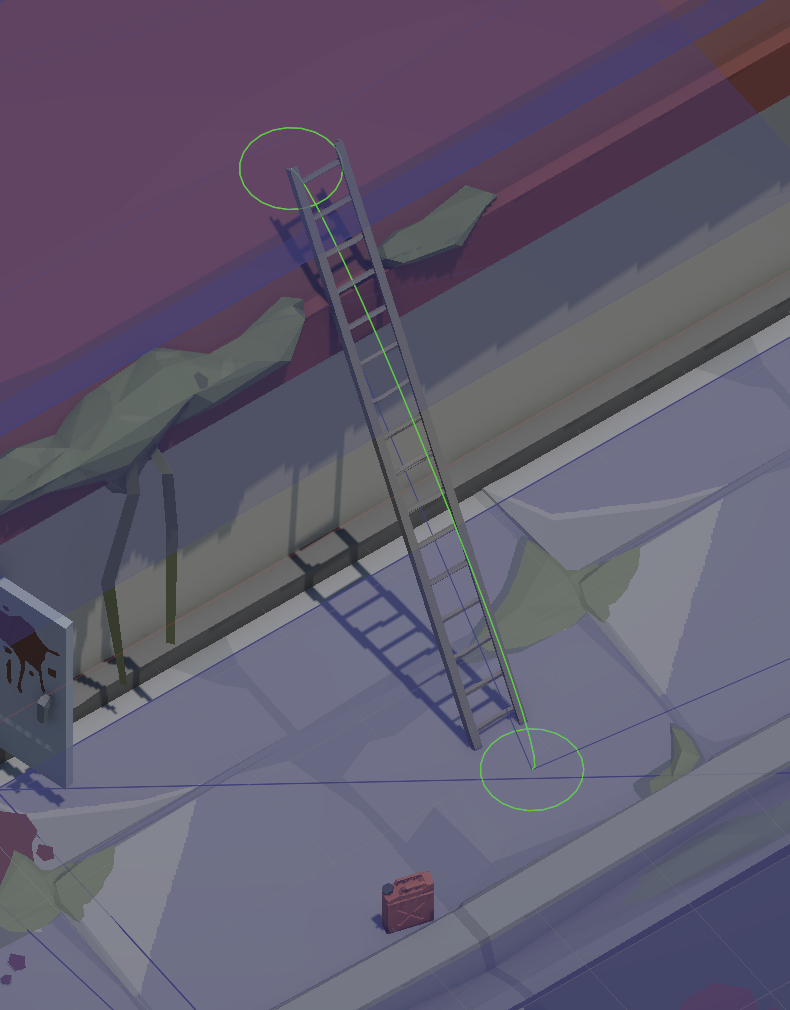
using System.Collections;
using System.Collections.Generic;
using Pathfinding;
using Pathfinding.ECS;
using UnityEngine;
using static AnimatorTags;
using static AnimatorParameters;

[ExecuteAlways]
public class LadderLink : MonoBehaviour, IOffMeshLinkHandler, IOffMeshLinkStateMachine
{
  [Tooltip("The ladder mesh object (contains rotation, top & bottom points).")]
  public GameObject ladderObj;

  [Header("Setup State")]
  [Tooltip("If true, this ladder is placeable by a unit. Pre-existing ladders should set this to false.")]
  public bool canSetup = false;

  public Transform top;    // Top of the ladder
  public Transform bottom; // Bottom of the ladder

  NodeLink2 nodeLink;

  [Header("OffMeshLink Points")]
  [Tooltip("These points follow the top and bottom automatically.")]
  public Transform bottomLink, topLink;

  public readonly float offset = 0.4f; // Offset between unit and ladder
  [HideInInspector] public Vector3 offsetDir;

  float ladderLength;

  private void Awake()
  {
    nodeLink = GetComponent<NodeLink2>();
    nodeLink.end = topLink;

    offsetDir = ladderObj.transform.forward;
    offsetDir.y = 0;
    offsetDir = -offsetDir.normalized;
    SetLinkPositions();

    ladderLength = (top.position - bottom.position).magnitude;

    // Before the ladder is built: disable the visual and the link
    if (Application.isPlaying && canSetup)
    {
      nodeLink.enabled = false;
      ladderObj.SetActive(false);
    }
  }

  private void OnEnable()
  {
    if (Application.isPlaying)
      GetComponent<NodeLink2>().onTraverseOffMeshLink = this;
  }

  private void OnDisable()
  {
    if (Application.isPlaying)
      GetComponent<NodeLink2>().onTraverseOffMeshLink = null;
  }

#if UNITY_EDITOR
  private void Update()
  {
    // In editor: keep link endpoints synced with the ladder transforms
    if (!Application.isPlaying)
    {
      if (!bottomLink || !topLink || !bottom || !top || !ladderObj) return;

      offsetDir = ladderObj.transform.forward;
      offsetDir.y = 0;
      offsetDir = -offsetDir.normalized;
      SetLinkPositions();
    }
  }
#endif

  /// <summary>
  /// Called when a unit builds the ladder.
  /// Smoothly moves the carried ladder into position and then enables the actual link.
  /// </summary>
  public void StartSmoothPlacement(GameObject carriedLadder, float duration)
  {
    if (!carriedLadder) return;

    canSetup = false;
    nodeLink.enabled = true; // Enable the link at start of placement

    // NOTE: Timing issue can sometimes cause short delay/error
    StartCoroutine(SmoothPlacementRoutine(carriedLadder, duration));
  }

  private IEnumerator SmoothPlacementRoutine(GameObject carriedLadder, float duration)
  {
    // Detach from parent and disable physics on the carried mesh
    carriedLadder.transform.SetParent(null);

    if (carriedLadder.TryGetComponent<Collider>(out var col))
      col.enabled = false;

    if (carriedLadder.TryGetComponent<Rigidbody>(out var rb))
      rb.isKinematic = true;

    // Smooth movement & rotation to the final target position
    Vector3 startPos = carriedLadder.transform.position;
    Quaternion startRot = carriedLadder.transform.rotation;
    Vector3 endPos = bottom.position;
    Quaternion endRot = ladderObj.transform.rotation;

    duration = Mathf.Max(0.01f, duration);
    float t = 0f;

    while (t < 1f)
    {
      t += Time.deltaTime / duration;
      float e = Mathf.Sqrt(1f - (1f - t) * (1f - t));

      carriedLadder.transform.SetPositionAndRotation(
        Vector3.Lerp(startPos, endPos, e),
        Quaternion.Slerp(startRot, endRot, e)
      );

      yield return null;
    }

    // Activate real ladder mesh and destroy carried one
    ladderObj.SetActive(true);
    Managers.Resource.Destroy(carriedLadder);
  }

  void SetLinkPositions()
  {
    bottomLink.position = bottom.position + offset * offsetDir;
    topLink.position    = top.position    - 1.5f * offset * offsetDir;
  }

  IOffMeshLinkStateMachine IOffMeshLinkHandler.GetOffMeshLinkStateMachine(AgentOffMeshLinkTraversalContext context)
  {
    Debug.Log("Started OffMeshLink traversal");
    return this;
  }

  void IOffMeshLinkStateMachine.OnFinishTraversingOffMeshLink(AgentOffMeshLinkTraversalContext ctx)
  {
    if (ctx.gameObject.TryGetComponent<ILadderClimbable>(out var c))
      UnitInitOnLinkEnd(c);
  }

  void IOffMeshLinkStateMachine.OnAbortTraversingOffMeshLink()
  {
    Debug.Log("Aborted OffMeshLink traversal");
  }

  IEnumerable IOffMeshLinkStateMachine.OnTraverseOffMeshLink(AgentOffMeshLinkTraversalContext ctx)
  {
    // If ladder is not active yet, do not allow traversal
    if (!ladderObj || !ladderObj.activeInHierarchy)
    {
      ctx.Abort(false);
      yield break;
    }

    if (!ctx.gameObject.TryGetComponent<UnitBase>(out var u) || u is not ILadderClimbable climbable)
    {
      ctx.Abort(false);
      yield break;
    }

    // If not moving animation state -> abort
    if (u.CurrentSMBInfo.tagHash != tagHashMove)
    {
      ctx.Abort(false);
      yield break;
    }

    // Disable rotation/local avoidance/gravity for climbing
    ctx.DisableRotationSmoothing();
    ctx.DisableLocalAvoidance();
    climbable.AI.enableGravity = false;

    bool climbingUp = !ctx.link.isReverse;
    Vector3 startPoint = (climbingUp ? bottom.position : top.position) + offsetDir * offset;
    Vector3 endPoint   = (climbingUp ? top.position : bottom.position) + offsetDir * offset;

    // Move to link start
    while (!ctx.MoveTowards(
        ctx.link.relativeStart,
        Quaternion.LookRotation(ctx.link.relativeStart - (Vector3)ctx.transform.Position, ctx.movementPlane.up),
        gravity: true,
        slowdown: true).reached)
    {
      if (u.CurrentSMBInfo.tagHash != tagHashMove) { AbortLink(ctx, climbable); yield break; }
      yield return null;
    }

    climbable.SetIsClimbUpOrDown(climbingUp);
    climbable.SetOnLadder(true);

    int startHash = climbingUp ? SNHLadderUpStart : SNHLadderDownStart;
    int endHash   = climbingUp ? SNHLadderUpEnd   : SNHLadderDownEnd;

    // Wait for climbing animation to activate
    while (u.CurrentSMBInfo.tagHash == tagHashMove) yield return null;
    if (u.CurrentSMBInfo.tagHash != tagHashClimb) { AbortLink(ctx, climbable); yield break; }

    while (u.CurrentSMBInfo.tagHash == tagHashClimb)
    {
      switch (u.CurrentSMBInfo.shortNameHash)
      {
        case var snh when snh == startHash:
          SyncWithLadder(ctx, u.transform, startPoint, endPoint, true);
          break;

        case var snh when snh == endHash:
          if (u.CurrentSMBInfo.normalizedTime > (climbingUp ? 0.35f : 0.5f))
          {
            RestoreRotation(ctx, u.transform, true);
            MoveToward(ctx, ctx.link.relativeEnd);
          }
          else
          {
            SyncWithLadder(ctx, u.transform, startPoint, endPoint, false);
          }
          break;

        default:
          SyncWithLadder(ctx, u.transform, startPoint, endPoint, false);
          float dist = Vector3.Distance(u.Position, endPoint);
          bool nearEnd = climbingUp ? dist < 1.23f : dist < 0.4f;
          if (nearEnd) climbable.SetOnLadder(false);
          break;
      }

      yield return null;
    }

    while (u.CurrentSMBInfo.tagHash == tagHashClimb) yield return null;
    if (u.CurrentSMBInfo.tagHash != tagHashMove) { AbortLink(ctx, climbable); yield break; }

    while (!ctx.MoveTowards(
        ctx.link.relativeEnd,
        Quaternion.LookRotation(ctx.link.relativeEnd - endPoint, ctx.movementPlane.up),
        gravity: false,
        slowdown: true).reached)
    {
      if (u.CurrentSMBInfo.tagHash != tagHashMove && u.CurrentSMBInfo.tagHash != tagHashIdle)
      {
        FinishLink(ctx, climbable);
        break;
      }
      yield return null;
    }

    Debug.Log("Finished OffMeshLink traversal");
  }

  void SyncWithLadder(AgentOffMeshLinkTraversalContext ctx, Transform tr, Vector3 start, Vector3 end, bool smooth)
  {
    float h = ((Vector3)ctx.transform.Position - start).magnitude;
    float ratio = Mathf.Clamp01(h / ladderLength);
    Vector3 p = Vector3.Lerp(start, end, ratio);

    if (smooth)
    {
      Vector3 next = Vector3.MoveTowards(ctx.transform.Position, p, ctx.deltaTime * 3f);
      ctx.transform.Position = new Vector3(next.x, tr.position.y, next.z);
    }
    else
    {
      ctx.transform.Position = new Vector3(p.x, tr.position.y, p.z);
    }

    Quaternion targetRot = ladderObj.transform.rotation;
    tr.rotation = smooth
      ? Quaternion.Slerp(tr.rotation, targetRot, ctx.deltaTime * 13f)
      : targetRot;
  }

  void MoveToward(AgentOffMeshLinkTraversalContext ctx, Vector3 targetPos)
  {
    ctx.transform.Position = Vector3.MoveTowards(ctx.transform.Position, targetPos, ctx.deltaTime * 2f);
  }

  void RestoreRotation(AgentOffMeshLinkTraversalContext ctx, Transform tr, bool smooth)
  {
    Quaternion look = Quaternion.LookRotation(-offsetDir);
    tr.rotation = smooth
      ? Quaternion.Slerp(tr.rotation, look, ctx.deltaTime * 8f)
      : look;
  }

  void FinishLink(AgentOffMeshLinkTraversalContext ctx, ILadderClimbable c)
  {
    Debug.Log("Finish Link");
    UnitInitOnLinkEnd(c);
    ctx.Teleport(ctx.link.relativeEnd);
  }

  void AbortLink(AgentOffMeshLinkTraversalContext ctx, ILadderClimbable c)
  {
    Debug.Log("Abort Link");
    UnitInitOnLinkEnd(c);
    ctx.Abort(false);
  }

  void UnitInitOnLinkEnd(ILadderClimbable c)
  {
    c.AI.enableGravity = true;
    c.SetOnLadder(false);
  }
}
This is my custom ladder off-mesh-link code.
And here is an example video:
OffMeshLink Issue example
You can see that after the ladder is placed, the agent pauses for a moment, right? At that moment, the following error occurs:
ArgumentOutOfRangeException: Specified argument was out of the range of valid values.
Parameter name: partIndex
Pathfinding.PathTracer.GetLinkInfo (System.Int32 partIndex) (at ./Packages/com.arongranberg.astar/Utilities/PathTracer.cs:1694)
Pathfinding.ECS.TraverseOffMeshLinkSystem.NextLinkToTraverse (Pathfinding.ECS.ManagedState state) (at ./Packages/com.arongranberg.astar/Core/ECS/Systems/TraverseOffMeshLinkSystem.cs:69)
Pathfinding.ECS.TraverseOffMeshLinkSystem.StartOffMeshLinkTraversal (Unity.Entities.SystemState& systemState, Unity.Entities.EntityCommandBuffer commandBuffer) (at ./Packages/com.arongranberg.astar/Core/ECS/Systems/TraverseOffMeshLinkSystem.cs:57)
Pathfinding.ECS.TraverseOffMeshLinkSystem.OnUpdate (Unity.Entities.SystemState& systemState) (at ./Packages/com.arongranberg.astar/Core/ECS/Systems/TraverseOffMeshLinkSystem.cs:42)
Pathfinding.ECS.TraverseOffMeshLinkSystem.__codegen__OnUpdate (System.IntPtr self, System.IntPtr state) (at <0cd40b5daa28465da9e65c4e14d13f5e>:0)
Unity.Entities.SystemBaseRegistry+<>c__DisplayClass9_0.b__0 (System.IntPtr system, System.IntPtr state) (at ./Library/PackageCache/com.unity.entities@e581b903be8e/Unity.Entities/SystemBaseRegistry.cs:249)
UnityEngine.Debug:LogException(Exception)
Unity.Debug:LogException(Exception) (at ./Library/PackageCache/com.unity.entities@e581b903be8e/Unity.Entities/Stubs/Unity/Debug.cs:17)
Unity.Entities.<>c__DisplayClass9_0:b__0(IntPtr, IntPtr) (at ./Library/PackageCache/com.unity.entities@e581b903be8e/Unity.Entities/SystemBaseRegistry.cs:253)
Unity.Entities.UnmanagedUpdate_00001677$BurstDirectCall:wrapper_native_indirect_0x45b35a5f0(IntPtr&, Void*)
Unity.Entities.UnmanagedUpdate_00001677$BurstDirectCall:Invoke(Void*)
Unity.Entities.WorldUnmanagedImpl:UnmanagedUpdate(Void*)
Unity.Entities.WorldUnmanagedImpl:UpdateSystem(SystemHandle) (at ./Library/PackageCache/com.unity.entities@e581b903be8e/Unity.Entities/WorldUnmanaged.cs:891)
Unity.Entities.ComponentSystemGroup:UpdateAllSystems() (at ./Library/PackageCache/com.unity.entities@e581b903be8e/Unity.Entities/ComponentSystemGroup.cs:717)
Unity.Entities.ComponentSystemGroup:OnUpdate() (at ./Library/PackageCache/com.unity.entities@e581b903be8e/Unity.Entities/ComponentSystemGroup.cs:687)
Pathfinding.ECS.AIMovementSystemGroup:OnUpdate() (at ./Packages/com.arongranberg.astar/Core/ECS/Systems/AIMovementSystemGroup.cs:211)
Unity.Entities.SystemBase:Update() (at ./Library/PackageCache/com.unity.entities@e581b903be8e/Unity.Entities/SystemBase.cs:418)
Unity.Entities.ComponentSystemGroup:UpdateAllSystems() (at ./Library/PackageCache/com.unity.entities@e581b903be8e/Unity.Entities/ComponentSystemGroup.cs:723)
Unity.Entities.ComponentSystemGroup:OnUpdate() (at ./Library/PackageCache/com.unity.entities@e581b903be8e/Unity.Entities/ComponentSystemGroup.cs:681)
Unity.Entities.SystemBase:Update() (at ./Library/PackageCache/com.unity.entities@e581b903be8e/Unity.Entities/SystemBase.cs:418)
Unity.Entities.DummyDelegateWrapper:TriggerUpdate() (at ./Library/PackageCache/com.unity.entities@e581b903be8e/Unity.Entities/ScriptBehaviourUpdateOrder.cs:523)
This doesn’t happen every time.
Sometimes it works correctly: after the ladder is placed, the agent immediately uses the link without any error.
By NodeLink.enabled I mean enabling or disabling the NodeLink2 component itself.
When the NodeLink2 component is disabled, the link is not connected.
When it is enabled, the link becomes connected/usable.