I am using recast graph, but i am struggling to know the right way to setup implementation for doors that have different tags.
So i have a door prefab which i want to place down on the navmesh between two walls which have nav mesh cuts, this door needs to change the tags under the door to “Staff Only”.
I am not sure how to correctly place accurate tags that matches the door’s shape/position.
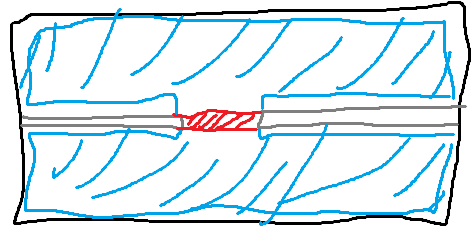
Here is a terrible drawing for example:
Where blue is general walkable tag, red is Staff Only tag.
I tried graph update component but this updates an entire triangle and is thus not accurate to the door shape. I need this to work at run time not just during editor baking too.
What is the correct approach here?
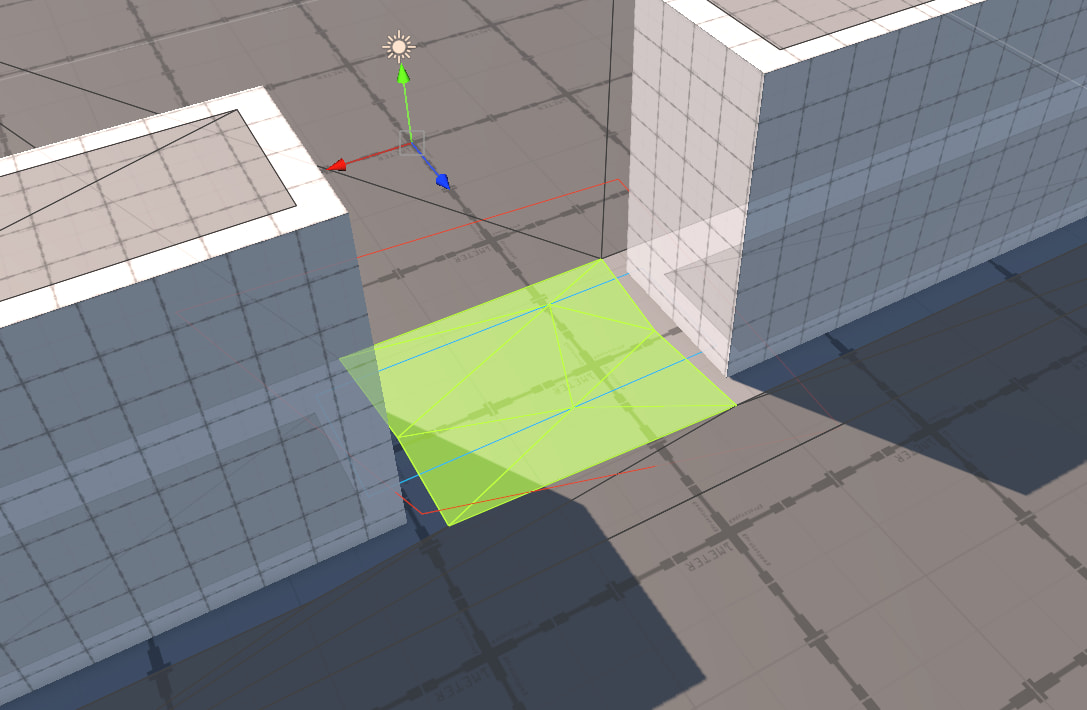
You can use “Is Dual” on your NavmeshCut set to true to fill in the geometry and then use a GraphUpdateScene with the bounds containing the new triangles like so:
Thanks for the reply, i notice graph update doesn’t really automatically update in the scene unless you bake, where as cuts seem to be automatic, kinda wish update scene was also automatic so its easier during edit mode, as soon as you move the update scene the modified tags reset so you have to keep rescan every time.
How come the cut component is automatically even if you move it around but graph update is not ?
Good question! But not one I have a direct answer for. If you’re particularly curious I can tag Aron, the developer, here and we can get his response?
Sure, i guess its more a request that the graph update scene auto should update the navmesh when instantiated/enabled or moved rather than doing it manually to be consistent with navmesh cuts component.
I also think i found a bug with off mesh links but will make a separate thread.
I think this would possibly necessitate a new component capable of doing this so as to not break compatibility with existing codebases. That said, I think this could easily be scripted yourself. You could have a script that bascially emulates what NavmeshCut does.
public float positionThreshold;
public float rotationThreshold;
public float scaleTreshold;

void Update(){
	// Check for a changed rotation or scale which will completely change the Bounds of this object
	bool scaleRotUpdated = false;
	if (Quaternion.Angle(transform.rotation, cachedRotation) > rotationThreshold) {
		scaleRotUpdated = true;
	}

	if (Mathf.Abs(transform.localScale.magnitude - scaleTreshold) > scaleTreshold) {
		scaleRotUpdated = true;
	}

	// If there is a scale or rotation change, update the cached bounds
	if (scaleRotUpdated) {
		UpdateCachedBounds();
	}

	// Check for a positional change and simply move the center over by that amount
	Vector3 positionDelta = Vector3.zero;

	if (Vector3.Distance(transform.position, cachedPosition) > positionThreshold) {
		positionDelta = transform.position - cachedPosition;
	}

	cachedBounds.center += positionDelta;

	if (positionDelta != Vector3.zero || scaleRotUpdated) {
		// This is where you'd update the bounds of a GraphUpdateObject
		// And then Astar.active.UpdateGraphs() just for those bounds.
	}
}
Warning: pseudocode.