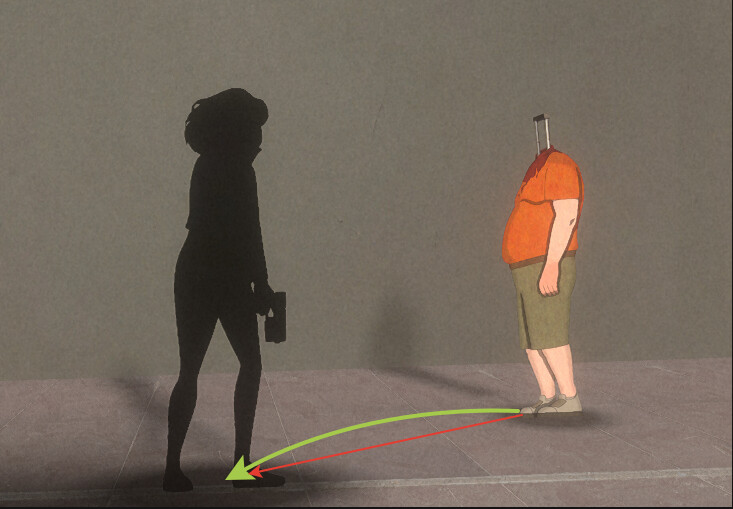
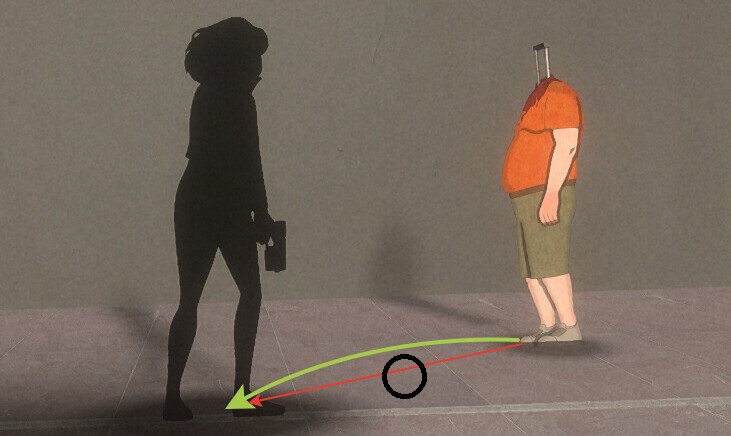
In our 2.5D game the enemies are mostly moving on X axis. If they are moving in the depth (z axis), I want to smoothen their movement. Their rotation is not changed during the movement (only the facing direction). It is hard to explain this in words, but generally I need to achieve movement along the green arrow instead of the red one.
Previously with NavMesh from Unity I took the nearest edge on the calculated path, multiplied the z axis of this direction by some factor and used this to manually calculate the movement. I want to replicate this behavior using this asset. Do I need to implement my own seeker? There is a lot of functionality in this asset and I am just beginning to dig into it, so any hints will be welcomed
My previous code lack of smoothing, avoidance and could bump into corners because it is changing the calculated route, but might give an extra explanation on what I’m trying to do
private void ApplyMovementToTransform(Vector3 target)
{
	var currentSpeed = speed * Time.deltaTime;
	var transform = _owner.transform;

	var moveTarget = target;
	var providerOriginTarget = target - TargetProvider.Origin;
	if (providerOriginTarget.magnitude > 1f) moveTarget = SmoothZMovement();
	transform.position = Vector3.MoveTowards(transform.position, moveTarget, currentSpeed);

	Vector3 SmoothZMovement()
	{
		if (TargetProvider.ZMultiplier.Approximately(1)) return target;

		var direction = providerOriginTarget.normalized;
		direction.z *= TargetProvider.ZMultiplier; // about 0.7f
		return transform.position + direction.normalized;
	}
}
I think you may get a lot of value from this documenation page, since you’re already familiar with implementing your own movement in Unity’s built-in pathfinding:
As an aside, this may also be a good use for Vector3.Slerp() for smoothing, since it’ll round out the movement?
If I understand what you are trying to achieve correctly (agents are moving in/out of the foreground along the Z axis, and you want them to follow a curved path as they do this, not a straight one, even when the shortest path to the player is a straight line), one possible way to do this is to calculate the halfway point to the player, offset it slightly, and then add a traversal penalty to all the nodes in a small circle around that point. Only then stop and calculate the path, and finally reverse the traversal penalties after the path is generated (so other agents aren’t affected). This should cause the agents to walk around the circle you mapped out, which will curve their path.
If you’re using a recast graph, this will probably only work if your tilesize isn’t large compared to your agents. It probably won’t work well with large polygons.
That’s clever! Agent will walk straight line if it is on the same X but further on Z, I need some sort of prioritization of X movement over Z movement, not a mandatory arcing. But it is solvable as I can decide when to modify this path penalty and how. However I concerned that two path calculations and a graph modification per agent is a costly operation, but we wouldn’t have more than a dozen of enemies at a time so maybe it is fine, I should check.
If you use the FollowerEntity movement script, you could also set the facing direction of the agent. Though I’m not sure how nicely this will work with the rest of the agent’s movement.
Thank you! I guess it’s not quite what I want, because I want a custom path calculation and not just custom movement along the calculated path, but! I stumbled on mention of SimpleSmoothModifier on that page and I guess the custom modifier is exactly what I need!

 Best of luck!