- A* version: Latest
- Unity version: 6.4.x.
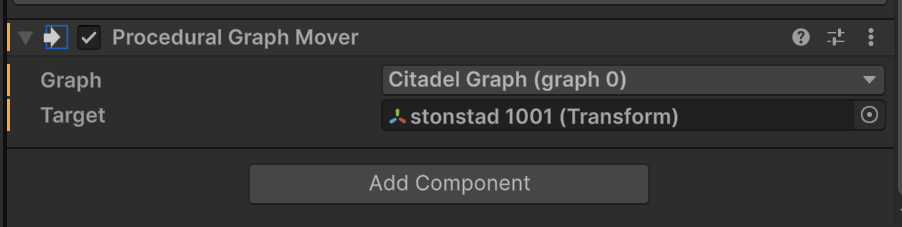
I have an issue where Procedural Graph Mover stops updating position of the associated Recast graph. I found a good reproduction step. By removing and re-adding the Procedural Graph Mover (at runtime) it will break.
Stepping through code, I can se that Procedural Graph Mover’s Update method returns early because graph.isScanned is somehow false. I don’t know why that would occur.
Here is a video showing reproduction steps and outcome.
t=11: Graph position updates as expected.
t=12: Procedural Graph Mover removed to reproduce bug.
t=27: Procedural Graph Mover is added and configured.
t=39: Procedural Graph Mover fails to update position.
@aron_granberg @tealtxgr
Hey Aron, Chris –
Are either of you able to weigh in on this behavior? It seems like a bug.
Thanks,
Shaun
It’s a bug and I’ll flag it as such, but I did notice that this only happens when I add the new ProceduralGraphMover when the index of the graph is not 0 and the game is not paused- your graph is index 1 which seems to be causing the issue.
If the index of the graph is 1 and the game is running it will fail as you demonstrated. If the index is 0 and the game is running it’s fine after I assign the target.
I did make this script to make sure if it’s all done in one frame it works fine, and it does:
    void ReplaceProceduralGraph(){
        Destroy(GetComponent<ProceduralGraphMover>());
        var newPGM = gameObject.AddComponent<ProceduralGraphMover>();
        newPGM.graph = AstarPath.active.graphs[1]; // Notice this is graph 1 not 0. In my test I created two graphs and deleted the first, meaning graph 0 is null but 1 exists.
        newPGM.target = transform;

        Debug.Log("Remade!");
    }
However I did notice some weird- the new component in the editor will say it’s assigned to graph 0 rather than 1, which I’d imagine may be related to what you’re seeing. Mainly documenting this part for Aron when he can take a look!
That said, the code I used did work to get around this issue. It’s basically that you can’t do it manually during runtime but you can do it within a single frame during runtime no(*) problem.
Thanks @aron_granberg @tealtxgr. Has a fix made it into a release?
I can confirm your feedback that when setting the graph of a procedural graph mover via code, the UI shows the incorrect graph! I set it to graph 1. Yikes!
Thanks for the report. I’ll include a fix for this in the next update.