- A* version: [5.4.6]
- Unity version: [6.3 LTS]
Fantastic package.
I have two Recast Graphs connected with an Off-Mesh link using NodeLink2. I wrote a some simple custom logic to teleport the agent from one end to the other on traversal. I have two agents in the scene. One is moved using a custom movement script with CharacterController. The other uses FollowerEntity.
As shown in the video, the agent using FollowerEntity has a delay before the teleport happens, and also doesn’t seem to know it should stop at the node link start position. As for the custom movement script simply walks off the edge. Could I please have an explanation for this behaviour, and a suggestion for the best course forwards?
Thanks in advance
For reference, here is the code for my teleportation logic (attached to the same GO as NodeLink2)
using System;
using Pathfinding;
using Pathfinding.ECS;
using UnityEngine;
using System.Collections;
using KinematicCharacterController;

//Attach to NodeLink's that will teleport the agent to the other end
public class TeleportLinkHandler : MonoBehaviour, IOffMeshLinkHandler, IOffMeshLinkStateMachine {
    private NodeLink2 myNodeLink;
    private void OnEnable() {
        myNodeLink = GetComponent<NodeLink2>();
        if(myNodeLink != null) myNodeLink.onTraverseOffMeshLink = this; // Set the node link to call this object's state machine to handle logic whenever an agent traverses this link
    }

    private void OnDisable() {
        if(myNodeLink != null) myNodeLink.onTraverseOffMeshLink = null; // Just to be safe, but really probably this should never matter
    }

    // Return this state machine to have its callbacks used during traversal
    public IOffMeshLinkStateMachine GetOffMeshLinkStateMachine(AgentOffMeshLinkTraversalContext context) {
        return this;
    }

    // This runs once, for the duration of the traversal
    IEnumerable IOffMeshLinkStateMachine.OnTraverseOffMeshLink(AgentOffMeshLinkTraversalContext context) {
        var endPos = (Vector3)context.link.relativeEnd;

        if (context.gameObject.TryGetComponent<KinematicCharacterMotor>(out KinematicCharacterMotor motor)) { // If the agent is being controlled by KCC
            motor.SetPosition(endPos);
        } else {
            context.Teleport(endPos);
        }

        yield break; // instant, just end here. Not really a coroutine, but it's still gotta be one bc that's the way it's coded
    }

    void IOffMeshLinkStateMachine.OnFinishTraversingOffMeshLink(AgentOffMeshLinkTraversalContext context) {

    }

    void IOffMeshLinkStateMachine.OnAbortTraversingOffMeshLink() {

    }
}
Here is my movement script for my agent
using UnityEngine;
using System.Collections;
// Note this line, if it is left out, the script won't know that the class 'Path' exists and it will throw compiler errors
// This line should always be present at the top of scripts which use pathfinding
using Pathfinding;

public class TestingAstarAI : MonoBehaviour {
    public Transform targetPosition;
    private Seeker seeker;
    private CharacterController controller;

    public Path path;

    public float speed = 2;

    public float nextWaypointDistance = 3;

    private int currentWaypoint = 0;

    public bool reachedEndOfPath;
    public void Start () {
        // Get a reference to the Seeker component we added earlier
        seeker = GetComponent<Seeker>();
        controller = GetComponent<CharacterController>();

        // Start to calculate a new path to the targetPosition object, return the result to the OnPathComplete method.
        // Path requests are asynchronous, so when the OnPathComplete method is called depends on how long it
        // takes to calculate the path. Usually it is called the next frame.
        seeker.StartPath(transform.position, targetPosition.position, OnPathComplete);
    }

    public void OnPathComplete (Path p) {
        Debug.Log("Yay, we got a path back. Did it have an error? " + p.error);
        if (!p.error) {
            path = p;
            // Reset the waypoint counter so that we start to move towards the first point in the path
            currentWaypoint = 0;
        }
    }

    public void Update () {
        if (path == null) {
            // We have no path to follow yet, so don't do anything
            return;
        }

        // Check in a loop if we are close enough to the current waypoint to switch to the next one.
        // We do this in a loop because many waypoints might be close to each other and we may reach
        // several of them in the same frame.
        reachedEndOfPath = false;
        // The distance to the next waypoint in the path
        float distanceToWaypoint;
        while (true) {
            // If you want maximum performance you can check the squared distance instead to get rid of a
            // square root calculation. But that is outside the scope of this tutorial.
            distanceToWaypoint = Vector3.Distance(transform.position, path.vectorPath[currentWaypoint]);
            if (distanceToWaypoint < nextWaypointDistance) {
                // Check if there is another waypoint or if we have reached the end of the path
                if (currentWaypoint + 1 < path.vectorPath.Count) {
                    currentWaypoint++;
                } else {
                    // Set a status variable to indicate that the agent has reached the end of the path.
                    // You can use this to trigger some special code if your game requires that.
                    reachedEndOfPath = true;
                    break;
                }
            } else {
                break;
            }
        }

        // Slow down smoothly upon approaching the end of the path
        // This value will smoothly go from 1 to 0 as the agent approaches the last waypoint in the path.
        var speedFactor = reachedEndOfPath ? Mathf.Sqrt(distanceToWaypoint/nextWaypointDistance) : 1f;

        // Direction to the next waypoint
        // Normalize it so that it has a length of 1 world unit
        Vector3 dir = (path.vectorPath[currentWaypoint] - transform.position).normalized;
        // Multiply the direction by our desired speed to get a velocity
        Vector3 velocity = dir * speed * speedFactor;

        // Move the agent using the CharacterController component
        // Note that SimpleMove takes a velocity in meters/second, so we should not multiply by Time.deltaTime
        controller.SimpleMove(velocity);

        // If you are writing a 2D game you should remove the CharacterController code above and instead move the transform directly by uncommenting the next line
        // transform.position += velocity * Time.deltaTime;
    }
}
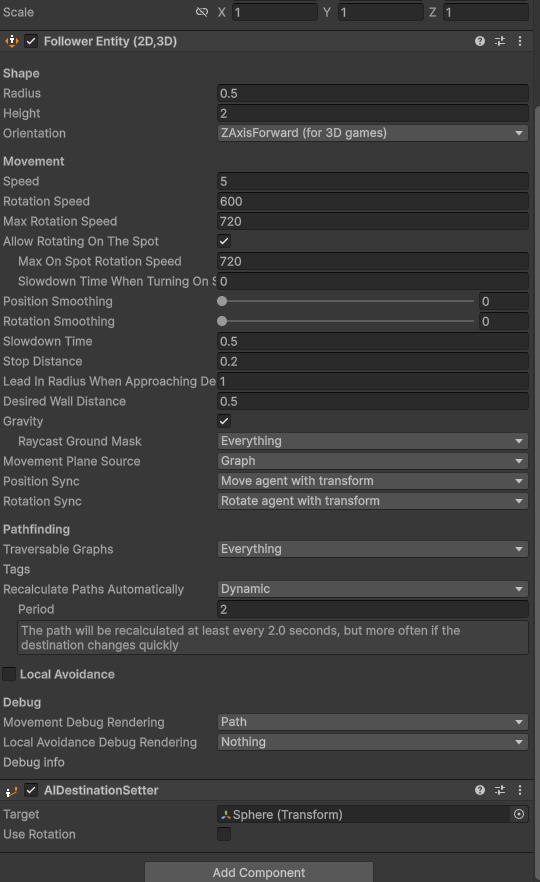
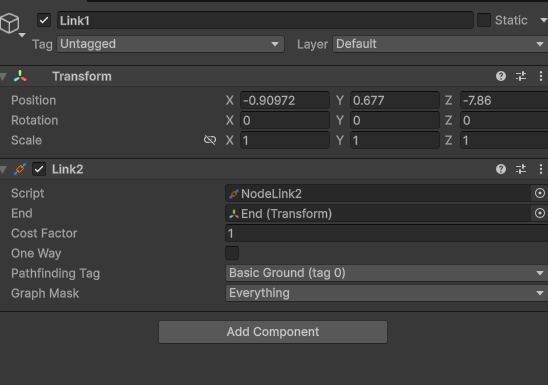

 . I applied it to the first end, and it now works for FollowerEntity, so thanks!