- A* version: [5.4.6]
- Unity version: [6000.4]
- In older version of Astar, I could place a nodelink2 a couple of units above or below the navmesh and would work fine. Clamping a nodelink gameobject to a terrain would always work. Now, it seems very finicky and I have to manually experiment with the start and end points to get a proper link. It needs to be very close to the navmesh and sometimes a little above and sometimes a little below.
I switched to using a single graph for the graph mask selection. In this manner, it appears consistent and link can be placed from 1 unit above to 1 unit below the mesh. Using 2 or more graphs in the graph mask makes the placement unpredictable and needs to be very close to the navmesh.
When you place the link’s GameObjects try holding CTRL+SHIFT then left-clicking and dragging the square that shows up at the pivot/center of the selected object and drag. This will push the object to the surface of the mesh under the mouse when moving it.
You may already know of this trick and be using it though, and if so, can you provide some more detailed reproduction steps? I’m seeing how the range has to be within 1 unit but I’m not seeing it be inconsistent. But I’m also very much used to using the CTRL+SHIFT modifier to move objects on a surface, hence why I suggested it.
-Create a new scene, add 2 cubes. Scale them to 100X10X100.
-Create a new GameObject and add AstarPath component.
-Add a recast graph and set the bounds to include the cubes.
-Add a second recast graph by duplicating the first graph.
-Add 2 new GameObjects and place them on each cube.
-Add Nodelink2 component to the first GameObject and set the GraphMask to “Everything”.
-Set the second GameObject as the NodeLink end.
-Set AstarPath: Settings, Debug, Graph Coloring to “Areas”.
-Set the Recast Visibility at the top to only the second graph.
-Hit Play and then experiment with moving the NodeLink start up and down.
It seems when there are two graphs, and a single NodeLink is used for both there are problems. If the Graph Mask is set to a single graph, then everything works fine.
Yeah I tried this on 6.3 and 6.4 reproduced exactly as written but I’m not seeing any issues at all. Can you send this over as a blank project setup with this reproducible, and post a video of what this issue looks like as well?
I have attached a test project. Link to video showing issue is here. Switch to full screen and bump up the quality settings and should be easy to read:
Here is a link to the test project. (After opening the link, click on the download icon upper left corner). You will need to unzip and then add the Astar package after opening in Unity.
I’m sorry but I feel like I’m just royally misunderstanding what the issue here is. None of this seems out of the ordinary for me and it doesn’t change between one graph or two graphs. Even in your video it doesn’t seem problematic. If I’m missing something definitely let me know but none of this seems erratic to me.
In your video as well, the areas are not connecting - the two surfaces are different colors. The connecting line changes but the areas are not. They are a similar green but definitely different colors. Sorry this example has colors that are close. This is not meant to be mean: if you have any level of color blindness then it might be hard for you to see. You can add a third object into the scene and will change the random color seed which might help. Also I found that you sometimes have to do this in play mode for the area colors to be updated automatically.
1 Like
Ahhh I see. I was too focused on looking at the nodelink itself in your video. I see that now. But even in your reproduction project I don’t see this happening- with the areas. I also tried having a unit cross back and forth while I played with the nodelink settings but I’m not seeing any particularly regressive (?) behaviors.
So you said this is making hard to place- can you explain what issues you’re getting as a result of this? I’m very much not seeing any issue moving it like this. On my end so long as my nodelink is 1m from the graph I’m pretty much golden. The only “issue” i have is that when I move it, for a single frame, the nodelink is orange/broken. Then it instantly fixes itself. My areas stay as two seperate distinct areas mostly. I had one runtime where I hit play and it was all one area then I moved the nodelink and it was two again. And since then no matter what I’ve done I’ve always had two distinct areas. And I’ve tried to break it haha
Nope, I got it to do the thing now! I set graph coloring off of Area and then back onto it and now the graphs change colors when the link is there versus not. And now, my test unit can’t traverse a NodeLink that’s green/active.
I’m assuming this is the issue you’re having? Where now, these two graphs, since they’re treated as the same area, is causing them to just not use the NodeLink at all?
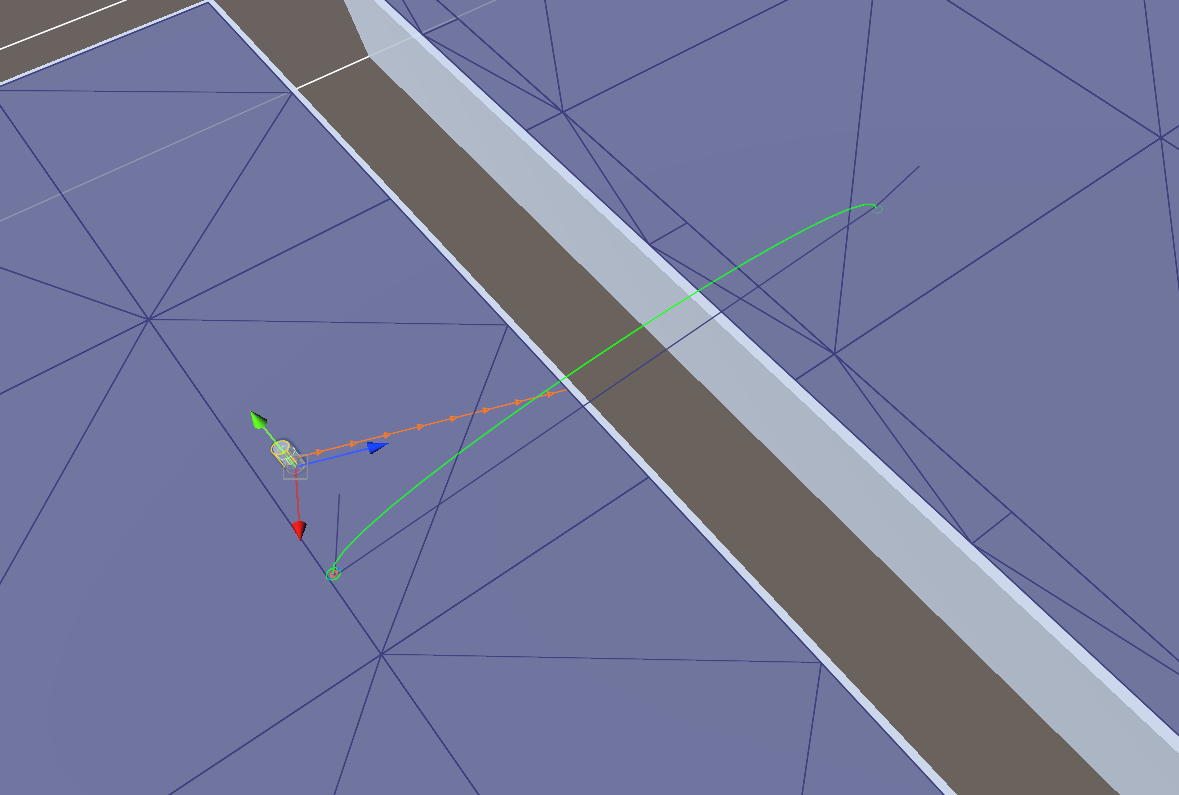
I’m not fully sure what repro steps made this “stop” functioning but before I look into that I want to confirm that this is the issue?
Yes. Often the Nodelink will not work at all. Other times it might work, but where it needs to be placed is very odd. Thanks for following up on this.
It’s what I’m here for  I’ll mark this as a confirmed bug now that I’m seeing the math here. How often is this causing issues for you?
This is not a game stopper. Currently, I user multiple nodelinks at the same point to handle different agent types. I would like to simplify my setup by using the nodelink graph mask that has been added to Astar. That way I could have a single link that would handle all agents. At this point it is not useable for me.