Looking for proper way to scanning/handling data with multiple AstarPath instances

  • A* version: 5.3.7
    • Our project fixed this version as dependency, requires back porting if patch needed.
  • Unity version: 2022.3.62f3

Hello,
I am the engineer responsible for optimization in our company.

Since we had to started separate AstarPath’s AstarData into individual levels as cache files, following below thread.

  • Title : Question About AStarPath Graph Loading Structure and Optimization
  • Thread ID : 18814

This is new account so I can’t post URL yet.

(admin edit: Question About AStarPath Graph Loading Structure and Optimization)

Note that I don’t want to necroing thread so I wrote up this thread.

However, the current workflow that made by me, is having some trouble for automation in our ends so I’m looking for solution about our problems.

TL;DR

  • I want to figure out what should I have done before and after for proper way to handling AstarPath.data(AstarData) or scanning.
    • Proper way to switching active instance while multiple instance exists for it.
    • Proper way to transfer scanned graphs data.
  • I want to use AstarPath each level only for editor, for simplifying workflow for co-workers.
    • Able to use same inspector interface.
    • Supporting Gizmos.
    • Able to scanning graph and serializing data to cache file independently from main AstarPath.
    • Holding graphs settings only.
  • I made handler component that supports for these problems.
    • We can provide source code of this component and editor if needed.

Background

  • Our project is 2D, top-down view, with multiple layers for depth, using Z axis.
  • We want to optimize memory, loading time and performance for AstarPath.
  • Current setup is centralized, every level’s graph are stored into single AstarPath, which is may suppose to used like this.
    • However, this causes huge processing time due loading to memory and deserialization.
  • We have 40 graphs.
    • Some level have multiple graphs for storing each Z layers’ graph.
  • I planned to utilize AstarData.DeserializeGraphsAdditive for separating graphs each level.
    • So I made handler component that uses AstarPath within editor only purpose.
      • That AstarPath will used for…
        • Scanning graphs for it’s depending level and save cache.
        • When it awake or being destroy on play, handler append or remove cache graphs to active AstarPath.
        • Simplifying workflow, I indented workflow that our co-worker will use same interface for each level to setting up graphs.
        • Supporting visualization through Gizmos.
      • Since handler’s AstarPath is only editor purposes, it’ll be destroyed at awake on play.
        • Also wouldn’t be saved for build, using HideFlags.DontSaveInBuild.
        • AstarPath will stores graphs without nodes data, I utilized serialization with settings at saving scene.

The problem

  • According to documentation (Saving and Loading Graphs, again, I can’t post links), AstarPath is assumed to be singleton, there’s various fail-safe for most of APIs.
    • This made some trouble to juggling two or more AstarPath instances even in edit mode.
      • This is the main reason that I want to looking for proper way to scanning/handling data with this scenario.
  • What I want to achieve is below :
  • Scanning specific AstarPath
    • I think it’s possible with disabling all of instances and enable single instance for scanning.
  • Serialize graphs
    • I have no idea but it throws various exception or error that intended to be fail-safe for singleton.
    • I also think it’s possible with ‘Scanning specific AstarPath’s way.
  • Migrate graphs between two AstarPath
    • Since we are planning this for reduce loading time and memory optimization purpose with keeping workflow simple, I want to main AstarPath doesn’t have any graphs at all in initial state and feed them from handler component from each levels.
    • I’ve tried batch migration from main AstarPath’s graph data and I haven’t achieved my goal yet.
      • Open single scene that has main AstarPath instance.
      • Load all levels that requires main AstarPath to scan.
      • Transfer to each level of AstarPath with serialize and deserialize scanned data.
      • Level’s AstarPath has graph settings but it doesn’t have nodes data, I don’t know what it causes.
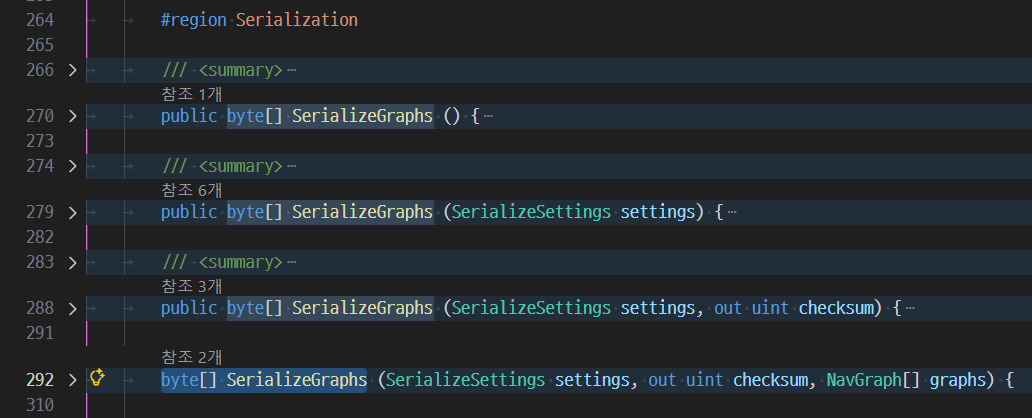
        • I used SerializeGraphs by reflection (it’s for just in case for future proof, I don’t want to modify code base as possible) with SerializeSettings.NodesAndSettings for specific graphs of main AstarPath’s data.

Side notes

  • Juggling two or more AstarPath instances in editor for handing data is cumbersome for developer UX.
    • Current workaround is disabling all instances and enable single desired instance.
    • I must assign desired instance to AstarPath.active member before performing APIs, it made boilerplate on batch automation codes in ours.
  • Mixture between editor and runtime logics makes hard to figure out what should I have done before and after on handling data.
    • I’ve seen some comments around code bases, there’s lots of care point to handing data or instances so I want to figure out proper way to manage them.

Thanks for reading my long summary on our situation and problems.

I’m gonna tag the Aron on this on to get back to you on. I think this is a pretty novel and deep issue that I think I’d probably just lead us both in circles on :upside_down_face: My only really thoughts reading this are that 1) in my experience being here, I’ve noticed the architecture for the asset is pretty open ended for building on, like you have with your custom handler. I think some custom tooling would help a lot with the list of things you wanted to achieve. What that tooling looks like is above my head sadly. I don’t want to common on a “proper way” of doing this though, so I’ll have to forward this to Aron to take a look at. He’ll know the right combination of tools built into the asset for this workflow.

Thanks for this :slight_smile: I’ll add the link to your post myself

Hi

Which graph type are you using?

If you are using recast graphs, then NavmeshPrefab - A* Pathfinding Project might be a solution?

It’s primarily intended for merging together tiles into a single large graph at runtime, though. Might not be suitable.

In general it will work as long as you keep only 1 AstarPath instance enabled in your scenes at any one time. In hindsight this was not the best architectural decision. I justify it by saying that it was made 14 years ago or so. Today the code would have been different. It’s quite hard to move away from, unfortunately.

This will be very tricky without serializing them in-between. I don’t see a simple way of doing it that doesn’t have a ton of edge cases.

But serializing a graph from one AstarPath instance, and then loading it in another would definitely work. But in that case I’d just recommend storing them as serialized graphs in the assets folder instead.

Why? Those methods are public, are they not? There’s even one for serializing just a single graph too.

Thanks for kind response,

If you are using recast graphs, then [NavmeshPrefab - A* Pathfinding Project] might be a solution?

Unfortunately, we are using AstarPath with GridGraph only because of tile-based environment. (you can follow up from linked thread of main thread body)

In general it will work as long as you keep only 1 AstarPath instance enabled in your scenes at any one time. In hindsight this was not the best architectural decision. I justify it by saying that it was made 14 years ago or so. Today the code would have been different. It’s quite hard to move away from, unfortunately.

If then it would be good if this project has data wrapper or handler for editor to allowing editor tooling or automation dedicatedly but I have no idea it would be easy to go due I haven’t read entire code base yet.

But serializing a graph from one AstarPath instance, and then loading it in another would definitely work. But in that case I’d just recommend storing them as serialized graphs in the assets folder instead.

This is far easy solution for what I’ve tried from now, here’s my implementation.

View code
internal enum Editor_AstarPathMigrationResult
{
    NothingToMigrate,
    Error,
    Succeed
}

internal class Editor_AstarPathActiveContext : IDisposable
{
    private AstarPath _target;
    private AstarPath _activedTarget;
    private (AstarPath instance, bool wasEnabled)[] _instances;
    
    public Editor_AstarPathActiveContext(AstarPath target)
    {
        _target = target;
        
        AstarPath.FindAstarPath();
        _activedTarget = AstarPath.active;
        
        _instances = GameObject.FindObjectsOfType<AstarPath>(true)
            .Select(instance => (instance, instance.enabled))
            .ToArray();
        
        foreach (var (instance, _) in _instances)
        {
            instance.enabled = false;
        }
        
        _target.enabled = true;
        AstarPath.FindAstarPath();
    }
    public void Dispose()
    {
        if (_instances == null)
        {
            return;
        }
        
        _target.enabled = false;
        
        if (_activedTarget)
        {
            _activedTarget.enabled = true;
            AstarPath.FindAstarPath();
        }
        
        foreach (var (instance, wasEnabled) in _instances)
        {
            instance.enabled = wasEnabled;
        }
        
        _instances = null;
    }
}

...

internal Editor_AstarPathMigrationResult Editor_MigrateFromLegacyGraphCache(
    TextAsset            legacyGraphCacheAsset,
    Func<NavGraph, bool> predicateMigrateTargetGraph,
    out List<string>     migratedGraphNames)
{
    if (!legacyGraphCacheAsset)
    {
        throw new ArgumentNullException(nameof(legacyGraphCacheAsset));
    }
    
    if (predicateMigrateTargetGraph == null)
    {
        throw new ArgumentNullException(nameof(predicateMigrateTargetGraph));
    }
    
    using var _ = new Editor_AstarPathActiveContext(Editor_graphScanner);
    
    var migratedGraphs = new List<NavGraph>();
    migratedGraphNames = new List<string>();
    
    try
    {
        AstarData graphScannerData = Editor_graphScanner.data;
        
        graphScannerData.DeserializeGraphs(legacyGraphCacheAsset.bytes);
        
        foreach (NavGraph graph in graphScannerData.graphs)
        {
            if (predicateMigrateTargetGraph.Invoke(graph))
            {
                migratedGraphs.Add(graph);
                migratedGraphNames.Add(graph.name);
            }
        }
        
        if (migratedGraphs.Count == 0)
        {
            return Editor_AstarPathMigrationResult.NothingToMigrate;
        }
        
        System.Reflection.MethodInfo serializeGraphsMethod = typeof(AstarData).GetMethod(
            nameof(AstarData.SerializeGraphs),
            0,
            System.Reflection.BindingFlags.Instance | System.Reflection.BindingFlags.NonPublic,
            null,
            new[] { typeof(SerializeSettings), typeof(uint).MakeByRefType(), typeof(NavGraph[]) },
            null
        );
        
        byte[] serializedMigrateTargetGraphs = serializeGraphsMethod.Invoke(
            graphScannerData,
            new object[]
            {
                SerializeSettings.Settings,
                null,
                migratedGraphs.ToArray()
            }
        ) as byte[];
        
        graphScannerData.DeserializeGraphs(serializedMigrateTargetGraphs);
        
        EditorUtility.SetDirty(Editor_graphScanner);
        
        Editor_Bake();
    }
    catch (Exception ex)
    {
        Debug.LogException(ex);
        return Editor_AstarPathMigrationResult.Error;
    }
    finally
    {
        Editor_graphScanner.data.ClearGraphs();
    }
    
    return Editor_AstarPathMigrationResult.Succeed;
}

...

private void Editor_Bake()
{
    if (!Editor_graphScanner)
    {
        return;
    }
    
    if (!gameObject.scene.IsValid())
    {
        return;
    }
    
    Editor_graphScanner.Scan();
    Editor_SaveGraphCache();
}

...

internal void Editor_SaveGraphCache()
{
    if (!Editor_graphScanner)
    {
        return;
    }
    
    if (!gameObject.scene.IsValid())
    {
        return;
    }
    
    string cachePath = Editor_GetGraphCachePath();
    
    byte[] serializedData = Editor_graphScanner.data.SerializeGraphs(SerializeSettings.NodesAndSettings);
    
    File.WriteAllBytes(cachePath, serializedData);
    AssetDatabase.Refresh();
    
    _graphCache = AssetDatabase.LoadAssetAtPath<TextAsset>(cachePath);
}
        
internal string Editor_GetGraphCachePath()
    => Path.Combine(
        Path.GetDirectoryName(gameObject.scene.path),
        $"{gameObject.scene.name}_AstarGraph.bytes"
    );

But still I have some trouble due exception about pre-baked nodes are pointing desired index in JsonSerializer.cs:L70.

public void SerializeConnections (Connection[] connections, bool serializeMetadata) {
	if (connections == null) {
		writer.Write(-1);
	} else {
		int persistentConnections = 0;
		for (int i = 0; i < connections.Length; i++) persistentConnections += persistentGraphs[connections[i].node.GraphIndex] ? 1 : 0;    //IndexOutOfRangeException raises while serializing.
		writer.Write(persistentConnections);
		for (int i = 0; i < connections.Length; i++) {
			// Ignore connections to nodes in graphs which are not serialized
			if (!persistentGraphs[connections[i].node.GraphIndex]) continue;
			SerializeNodeReference(connections[i].node);
			writer.Write(connections[i].cost);
			if (serializeMetadata) writer.Write(connections[i].shapeEdgeInfo);
		}
	}
}

And I found the logic resolving this in the implementation of AstarData.DeserializeGraphsPartAdditive.
I’d like to hear answers to the following questions, in case I’m just randomly grabbing any graph from the previous graph and serializing it:
(Refer to the Editor_MigrateFromLegacyGraphCache method in the quoted code)

  • Can node indices be arbitrarily assigned?
  • Are there any other data points within the nodes that require resolution or additional pre/post-processing?

But anyways, we are currently migrating by serializing/deserializing only the graph ‘information’ and then performing scans.

Why? Those methods are public, are they not? There’s even one for serializing just a single graph too.

Yeah serializing specific graphs is private in 5.3.7.

Could you post the exact error message you get? Do you get this from just calling SerializeGraph? It may also have been fixed in 5.4.x. I know I did a bunch of fixes for edge cases when I made SerializeGraph public.

No. Node indices need to be reserved up front. They need to be unique, but are often reused after nodes have been destroyed. But you should never have to do this yourself. It’s done by the AstarPath.InitializeNode method.

Any reason you cannot upgrade to 5.4.x?

Could you post the exact error message you get? Do you get this from just calling SerializeGraph? It may also have been fixed in 5.4.x. I know I did a bunch of fixes for edge cases when I made SerializeGraph public.

Good to hear that, I’ll send stack trace when I’m ready to grab exception, I’m currently doing workaround this with serialize graph without nodes and then scan them later.

No. Node indices need to be reserved up front.

Ah I’m sorry about some missing context here, I was forgot to mention that node index meaning node’s uint GraphIndex member, sorry for confusion.

So to clarify my question again, I’m wondering if it’s okay to arbitrarily update the GraphIndex that the Node was pointing to.

Any reason you cannot upgrade to 5.4.x?

The package that we used on project is already launched(live), so we are making it stable with fixed version for now, hope to see update it later when we have a chance.

This will most likely not work. The nodes also refer to internal data in the recast graph → tiles array. If you simply change which graph it is using, it will not be able to find its internal data.

1 Like

This will most likely not work. The nodes also refer to internal data in the recast graph → tiles array. If you simply change which graph it is using, it will not be able to find its internal data.

Got it, so for now, it seems stable to just fetch the graph information first and then perform the scan again. Thank you for confirming the stability.
It seems we did well to just read the code and not make arbitrary changes.

I’ll go ahead and mark this thread as resolved for now. Thank you for your kind response!
Edit : I have no idea that I can’t edit main thread, maybe wonder it would related by modifying by moderators… so if any moderators see this, I would appreciate that put [Resolved] at front of thread title.

That said, I’d like to offer some feedback: Would you consider providing an editor API in the future that specifically helps handle graph cache data in low-level? (change name, order, transfer, etc)

While this might initially involve some duplicate implementation, as you know, game development requires tailored solutions for each project’s unique circumstances, so an API that helps structure workflows would undoubtedly be beneficial.

1 Like

Hello Aron,

Through this work, we were able to make initialization for 14 times faster in specific environments. (7s → 0.5s)
Thank you for your proactive assistance; we couldn’t have achieved this without your help.

1 Like