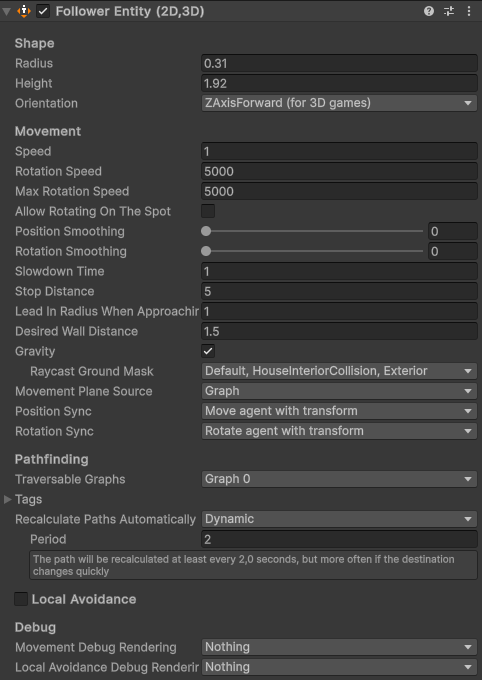
I’m facing a rather annoying issue, with the FollowerEntity.
Basically, sometimes after the agent reaches its destination, it will just stand there because reachedEndOfPath never becomes true. I have stopping distance set at 2 and the agent is definitely within that range.
The weird thing is, this never happens if I have the gameobject with the FollowerEntity component selected in the hierarchy, and the component is expanded. The bug still happens if the gameobject is selected but the component is minimized in the inspector though.
I cannot make use of the debug info within the component inspector, because whenever the bug happens and I go select the agent to view the inspector, it instantly fixes itself and the agent reaches the destination correctly.
If this was only an editor bug I could deal with it, however the issue also persists in builds.
I’m happy to provide more information, but I do not know what information would be useful right now, so feel free to ask.
The issue is caused by setting facingDirection when calling SetDestination to anything else than default.
I noticed the issue only kept happening when the agent was reaching targets which I had set a specific facing direction on. For now I have removed the facing direction completely, and the issue has disappeared. I’m still looking for a proper fix however, because it has an impact for how believable the AI looks arriving to certain things with the wrong orientation.
Worth noting that I noticed that the issue fixes itself as well if movementOverrides.AddBeforeMovementCallback or movementOverrides.RemoveBeforeMovementCallback is called when the agent has reached the destination (similarly how expanding the inspector of FollowerEntity does).
Also having posted the code, I might as well ask, is there no way to add a PathEndingCondition directly to FollowerEntity, similarly as you can set the travesalProvider? I couldn’t find anything in the docs. As you can see right now I have to calculate the path manually and then set it with SetPath, which makes me unable to set the facing direction.
Yes indeed, I should have been a little more clear, but both validatePathBeforeMoving and customPathEndCondition are false for this scenario.
EDIT: I noticed that with those two parameters being false most of the code I posted is actually redundant, and the only notable thing here is setting the facing direction… oh well.
Also here are the settings for follower entity. Agent traversalProvider is also set to null in this scenario. I’m also using a script based on the MecanimBridge demo for root motion movement.
This got me thinking of this issue I had been having, and turned on the facing direction setting for my movement scripts.
And indeed, selecting the agent no longer makes it reach the destination. It turns out the issue is that the agent just never arrives to the destination if there is a facing direction set.
I turned on the debug rendering and the agent is just endlessly wiggling on top of the destination point, even when it has already reached both the wanted orientation and position.
I cannot find any properties for setting the threshold for when the destinationFacingDirection has been reached. What is the rotational difference between agent rotation and wanted facing direction for the script to consider the facing direction reached?
Well, I did some digging and quickly found where the orientation threshold is checked in script.
In JobRepairPath.cs on line 280 I changed
const float ANGLE_THRESHOLD_COS = 0.9999f;
to
const float ANGLE_THRESHOLD_COS = 0.95f;
and now it seems to work without an issue.
It is worth noting that I’m using root motion, and that original angle threshold is quite harsh, I guess my agent just never reached the rotation precisely enough.
I do think this threshold should be exposed similarly as we have ‘stop distance’ for the position. For example in my game one enemy type does not necessarily need to perfectly reach the desired orientation, so it would be nice to be able to tune it per agent basis.
To elaborate, the enemy type is a human and he visually performs tasks in the house. You can imagine that if in real life you want to interact with something you don’t have to be completely perpendicular to it most of the time, but you probably won’t try to wash your hands in the sink behind your back either, so it would be nice to set the angle threshold for some of the interactions I have.
Either way my issue is fixed for now and everything is working great with this small change as far as I can see
Wow what a good find! Nice digging there. I’ll tag Aron on this update- maybe that variable could be exposed or otherwise altered in someway, good suggestion