- A* version: 5.2.2
- Unity version: 2022.3.35f1
We’re getting a lot of false positives when tearing down (and to some extent when instantiating) prefabs in our scenes. Where the prefab contains RecastNavmeshModifier that are non-dynamic. The error is "The RecastNavmeshModifier has been moved or resized since it was enabled..."
The cause seem to be that a parent game object starts out as enabled, trickling down to the RecastNavmeshModifier components OnEnabled which grabs the bounds of a collider. The parent game object is later disabled. Again causing a event chain to reach OnDisabled on the RecastNavmeshModifier, which again grabs the bounds based on the same collider. The only problem is that due to the parent object being disabled, the collider will always report a zero-size bounds (see the note in Unity Collider documentation). Which subsequently triggers the error.
Maybe make this error logging optional?
Hi there, I’ll go ahead and tag @aron_granberg on this and see what he think of this suggestion  Thanks for letting us know!
Dont know if this is a magic Unity thing. Tried to reproduce in a smaller test project without much success.
In our main project, the prefabs we spawn are quite large (game object and component wise) and the spawn order etc is rather lenghty and complicated (it goes on for a few seconds). The collider info retrieved via the CalculateBounds call in NavmeshRecastModifier differs in the collider bounds center. It seem to be random (does not trigger predictably). The center position is almost the same during OnEnabled and OnDisabled, but big enought to trigger the error log.
And no, nowhere in our codebase do we move the spawned prefabs (unless you count providing position and rotation during instantiation).
This could happen due to static batching. Are you using static batching for some of these objects?
Nope, no static batching involved. The whole enable/disable flipping is done in our level generator logic (which turns connecting elements, such as walls/doors etc, on/off between placed modules in the level). Which runs in the Start method (which returns a IEnumerator in our case to spread the generator stuff over several seconds)
For now I’ve just removed the whole if (!this.dynamic) check/scope in OnDisable
We also get this error when coming out of playmode in editor:
The RecastNavmeshModifier has been moved or resized since it was enabled. You should set dynamic to true for moving objects, or disable the component while moving it. The bounds changed from Center: (-7.31, 31.84, 86.56), Extents: (5.18, 17.29, 8.23) to Center: (-8.35, 31.84, 86.56), Extents: (6.23, 17.29, 8.23)
Note that for the same game component, if I just disable it at runtime in the editor hierarchy there is no error logged. It’s only when tearing down the scene which calls OnDisable.
No static batching is used.
@aron_granberg
I have the same problem. Some objects throws error, and some not.
Version 5.4.5
The settings of RecastNavmeshModifier:
Include in scan: Auto
Geometry Source: Collider
SurfaceType : UnwalkableSurface
Dynamic: Off
Solid: On
Also gameobject marked as static (without I also encounter error).
Hello,
I have found out where the issue is comming from and how to make a workaround.
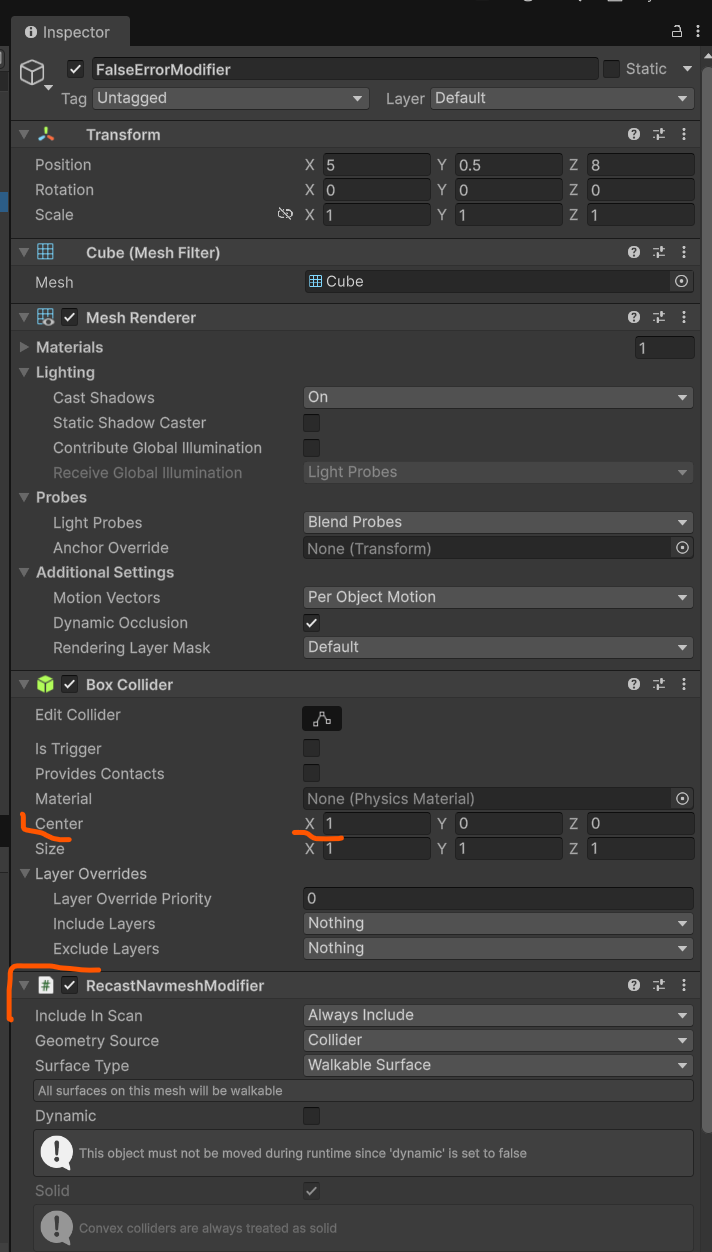
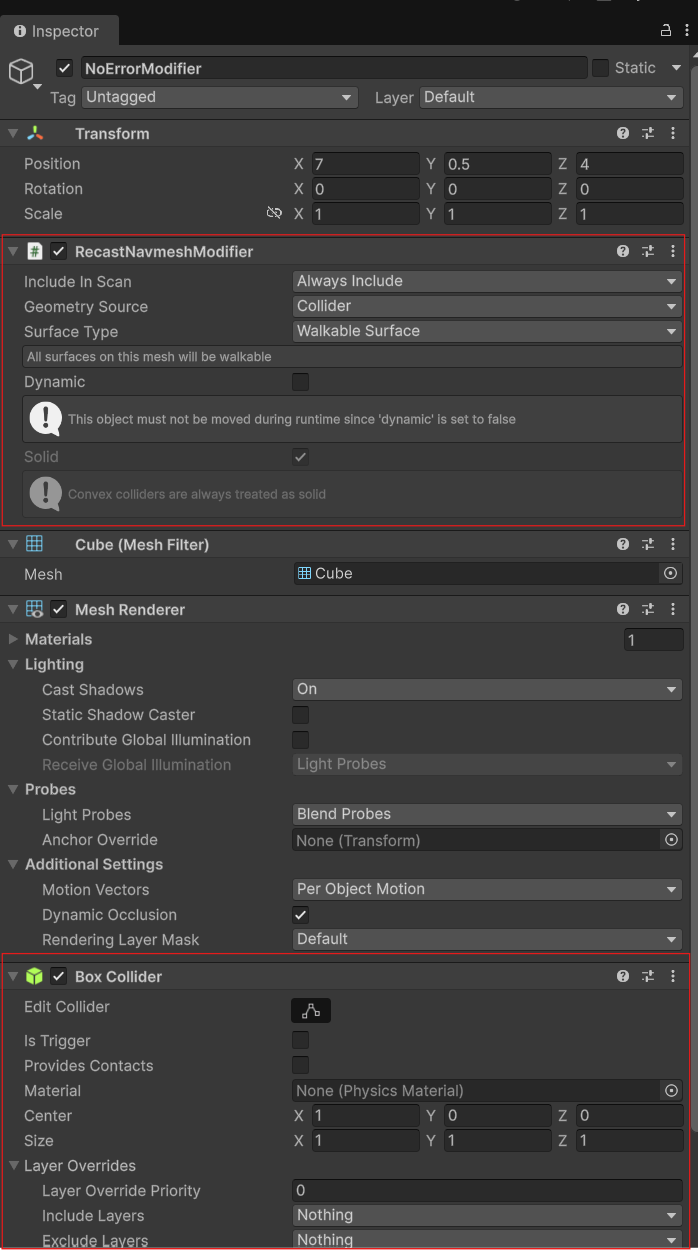
It is cause during call of “OnDisable” where the change of bounds is checked. If you have the RecastNavmeshModifier which is working with Collider and you have changed the collider center, this is not been taken in account during disposing of the gameObject ant therefore there is the error.
Repro steps:
- Create project with A* and terrain
- Add Recast graph
- Add the static object with collider to create obstacle
- Change collider “center” property
- Add RecastNavmeshModifier. It has to be added after the collider (in the inspector position)
- RecastNavmeshModifier - Always include, Geometry source - Collider and unselect Dynamic option
- Star Play mode and turn it off again
- Error apears
Workaround:
- Just move RecastNavmeshModifier before the collider in the Inspector (therefore the OnDisable method will be called on RecastNavmeshModifier before the collider)
1 Like
Wow impressive find– very particular setup! I did replicate it exactly as you said on 5.4.5, Unity 6.0. Tagging Aron to take a look.
1 Like
@aron_granberg Could you take a look on it? Is it possible to fix it?
Very nice find!
In the next update, I’ll add a check that avoids logging this error if the new bounds extents are (0,0,0), indicating that the collider has likely been destroyed before the RecastNavmeshModifier.
1 Like