Environment
-
Unity: 2022.3.62f2
-
A* Pathfinding Project Pro: 5.4.5
-
World type: Spherical World
Goal
I am implementing a navigation system for a Spherical World as described in the A* Pathfinding Project documentation,
where agents can walk on walls and ceilings, similar to Deep Rock Galactic.
The world is built using a procedural mesh with a chunk-based structure.
-
Geometry is generated via Marching Cubes
-
Each chunk owns its own Navmesh Graph
-
Agents must be able to navigate seamlessly across chunk boundaries
Navmesh setup overview
-
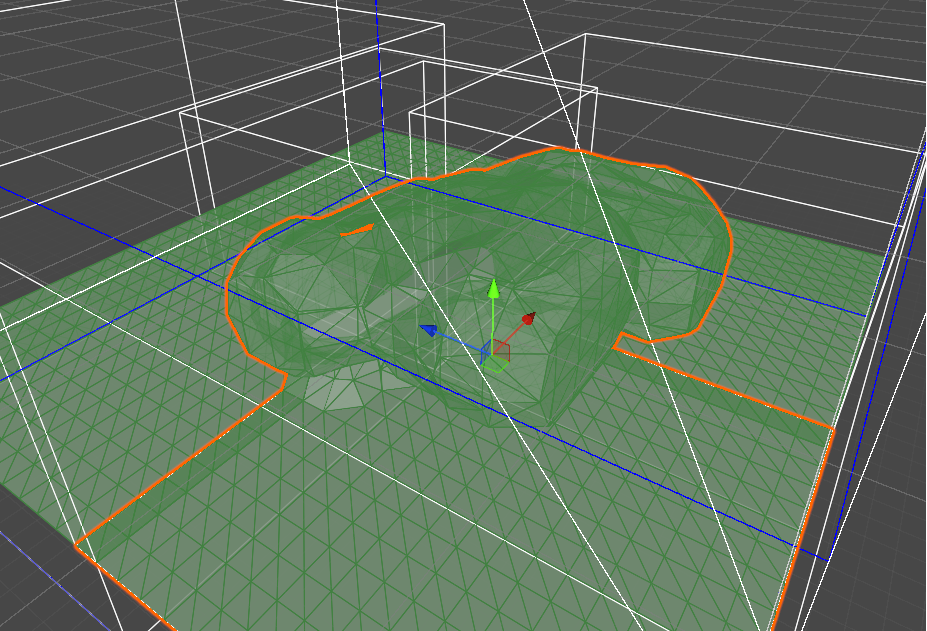
Procedurally generated meshes are injected directly into Navmesh Graphs
-
Marching Cubes generation includes padding at chunk borders before baking
-
Boundary triangles between adjacent chunks are topologically identical
-
In theory, navmeshes across chunks should connect seamlessly
Attempt 1
Direct stitching using GraphNode.Connect
Approach
-
Adjacent chunk Navmesh Graphs are stitched using
GraphNode.Connect() -
At the graph search level, all chunks behave as a single navigation graph
Result
AIPathAlignedToSurface
-
Path calculation and movement across chunks work correctly
-
However, traversal over surfaces with bends greater than 90° is not possible
-
I understand this limitation is intentional by design
FollowerEntity
-
Wall and ceiling traversal itself works
-
However, the agent stops at chunk boundaries
-
The path is continuous, but runtime movement fails at the boundary
Analysis
-
GraphNode.Connect()does not provide sufficient portal / surface transition data
required byFollowerEntity -
As a result:
-
Pathfinding succeeds
-
Local movement logic treats the connection as incomplete
-
Code snippet
graphA.GetNodes(node =>
{
    Vector3 pos = (Vector3)node.position;
    if (!overlapBounds.Contains(pos)) return;

    NNInfo info = AstarPath.active.GetNearest(pos, constraint);
    if (info.node == null) return;

    float distSqr = (info.position - pos).sqrMagnitude;
    if (distSqr < SQR_STITCH_DIST_THRESHOLD)
    {
        GraphNode targetNode = info.node;

        if (targetNode.position == node.position &&
            !node.ContainsOutgoingConnection(targetNode))
        {
            uint cost = (uint)(targetNode.position - node.position).costMagnitude;
            GraphNode.Connect(
                node,
                targetNode,
                cost,
                OffMeshLinks.Directionality.TwoWay
            );
        }
    }
});
Attempt 2
Stitching using NodeLink2
Approach
-
Instead of
GraphNode.Connect(),NodeLink2objects are created at chunk boundaries -
These act as explicit portals between navmesh surfaces
Result
FollowerEntity
-
Successfully navigates across chunk boundaries
-
Works correctly even across surface transitions exceeding 90°
Drawbacks
-
Each
NodeLink2creates two GameObjects -
In a procedural, chunk-based Spherical World:
-
The number of GameObjects grows rapidly
-
This becomes impractical for performance and management
-
-
In the worst case, this can result in up to ~60,000 NodeLinks
(average is lower, but the upper bound is problematic)
Code snippet
graphA.GetNodes(node =>
{
    Vector3 pos = (Vector3)node.position;
    if (!overlapBounds.Contains(pos)) return;

    TriangleMeshNode triNode = node as TriangleMeshNode;

    NNInfo info = AstarPath.active.GetNearest(pos, constraint);
    if (info.node == null) return;

    float distSqr = (info.position - pos).sqrMagnitude;
    if (distSqr < SQR_STITCH_DIST_THRESHOLD)
    {
        info.node.GetConnections(adjNode =>
        {
            TriangleMeshNode triAdjNode = adjNode as TriangleMeshNode;

            if (ShareEdgeByPosition(triNode, triAdjNode))
            {
                if (!node.ContainsOutgoingConnection(adjNode))
                {
                    NavPortalFactory.CreatePortal(
                        (Vector3)triNode.position,
                        (Vector3)triAdjNode.position
                    );
                }
            }
        });
    }
});
Core questions
Under the following conditions:
-
Spherical World navigation
-
Chunk-based Navmesh Graphs
-
Using
FollowerEntitywith A*PPP
-
Is there a recommended or intended approach to allow
FollowerEntity
to traverse chunk boundaries without creating large numbers ofNodeLink2GameObjects? -
Alternatively:
-
Is there a way to provide the portal / surface transition data
required byFollowerEntitydirectly at the GraphNode level? -
Is there a non-GameObject-based connection mechanism
that is functionally equivalent toNodeLink2?
-
Any guidance would be greatly appreciated.