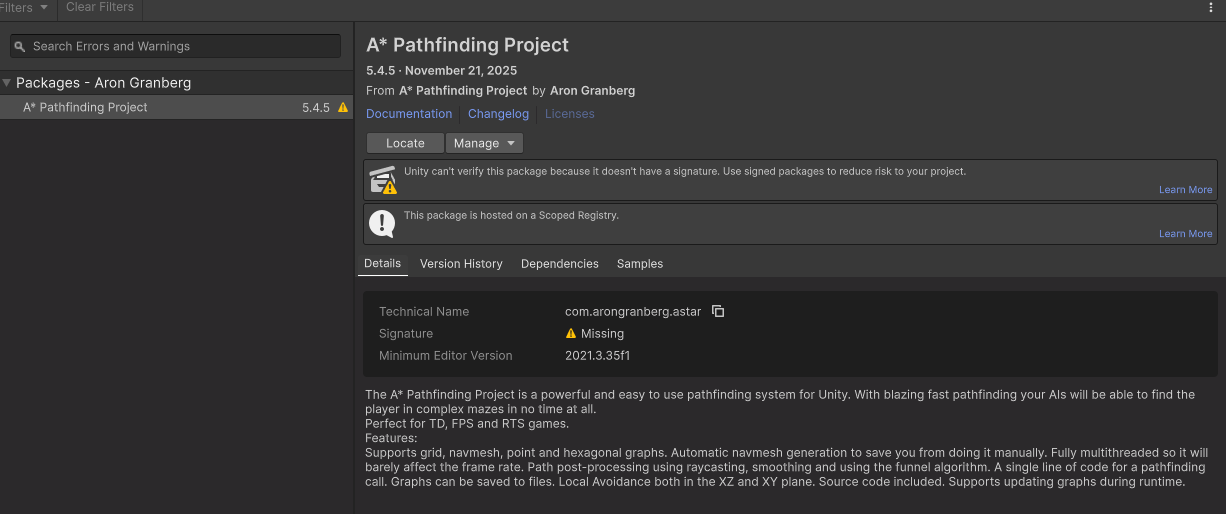
How to add Signature? I use Unity 6.3
1 Like
Thanks! I’ll take a look at this for the next update.
You don’t need to do anything, the package will work just as before.
1 Like
I just got this when upgrading to Unity 6.4, and Astar 5.4.6 (pro).
1 Like
Same warning, Unity 6.4 and latest Astar 5.4.6. “Signature missing” warnings in editor toolbar and package monitor annoying but otherwise working fine. Thanks.
1 Like
Will publish a new version this week which fixes this.
FYI - I can still see the warning after updating to 5.4.7
On what version of Unity? Not seeing it on my end. AFAIK version shouldn’t matter… but Unity is weird sometimes so…
I am on 6000.3.17f1, macOS 26.6.2
Crap. That’s an environment I cannot test. Are you able to really quick spin up a blank project and try it? Or even a full re-import of the asset?
Yes, I tried a new empty project, adding a scoped registry to the manifest, and after hitting install in the package manager, the warning is shown, and so it is after the installation.
Gotcha. I marked this for Aron to take a look at since he’s more familiar with the ins and outs of the actual package management with Unity. Sorry to hear this is still an issue for you!
1 Like