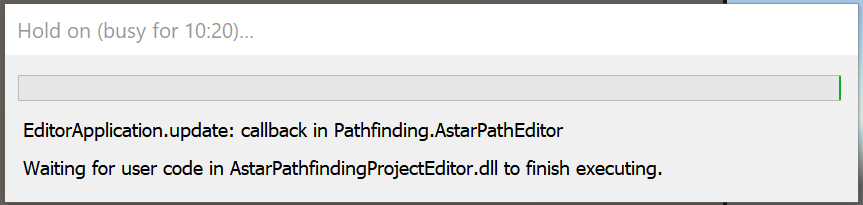
Sorry for the slow response, but the version of Burst being used was 1.8.27. Technically none now since I’ve turned Burst off.
Here’s the full manifest:
{
  "dependencies": {
    "com.clockworklabs.spacetimedbsdk": "https://github.com/clockworklabs/com.clockworklabs.spacetimedbsdk.git",
    "com.graesonb.chat-gpt-wrapper-for-unity": "https://github.com/GraesonB/ChatGPT-Wrapper-For-Unity.git",
    "com.handzlikchris.fastscriptreload": "https://github.com/handzlikchris/FastScriptReload.git?path=Assets",
    "com.kyrylokuzyk.arfoundationremote": "file:../Assets/Plugins/ARFoundationRemoteInstaller/com.kyrylokuzyk.arfoundationremote.tgz",
    "com.syomus.proceduraltoolkit": "https://github.com/Syomus/ProceduralToolkit.git#upm",
    "com.unity.2d.psdimporter": "9.1.1",
    "com.unity.2d.sprite": "1.0.0",
    "com.unity.ai.assistant": "2.18.0-pre.2",
    "com.unity.ai.navigation": "2.0.10",
    "com.unity.cinemachine": "3.1.5",
    "com.unity.collab-proxy": "2.11.3",
    "com.unity.ide.rider": "3.0.39",
    "com.unity.ide.visualstudio": "2.0.26",
    "com.unity.inputsystem": "1.18.0",
    "com.unity.mathematics": "1.3.3",
    "com.unity.mobile.android-logcat": "1.4.7",
    "com.unity.multiplayer.center": "1.0.0",
    "com.unity.nuget.newtonsoft-json": "3.2.2",
    "com.unity.postprocessing": "3.5.1",
    "com.unity.recorder": "5.1.4",
    "com.unity.test-framework": "1.6.0",
    "com.unity.timeline": "1.8.10",
    "com.unity.toolchain.macos-arm64-linux-x86_64": "2.0.5",
    "com.unity.toolchain.win-x86_64-linux-x86_64": "2.0.11",
    "com.unity.ugui": "2.0.0",
    "com.unity.xr.arcore": "6.0.6",
    "com.unity.xr.arfoundation": "6.0.6",
    "com.unity.xr.arkit": "6.0.6",
    "dev.voltstro.unitywebbrowser": "2.2.8",
    "dev.voltstro.unitywebbrowser.engine.cef.win.x64": "2.2.8",
    "com.unity.modules.accessibility": "1.0.0",
    "com.unity.modules.ai": "1.0.0",
    "com.unity.modules.androidjni": "1.0.0",
    "com.unity.modules.animation": "1.0.0",
    "com.unity.modules.assetbundle": "1.0.0",
    "com.unity.modules.audio": "1.0.0",
    "com.unity.modules.cloth": "1.0.0",
    "com.unity.modules.director": "1.0.0",
    "com.unity.modules.imageconversion": "1.0.0",
    "com.unity.modules.imgui": "1.0.0",
    "com.unity.modules.jsonserialize": "1.0.0",
    "com.unity.modules.particlesystem": "1.0.0",
    "com.unity.modules.physics": "1.0.0",
    "com.unity.modules.physics2d": "1.0.0",
    "com.unity.modules.screencapture": "1.0.0",
    "com.unity.modules.terrain": "1.0.0",
    "com.unity.modules.terrainphysics": "1.0.0",
    "com.unity.modules.tilemap": "1.0.0",
    "com.unity.modules.ui": "1.0.0",
    "com.unity.modules.uielements": "1.0.0",
    "com.unity.modules.umbra": "1.0.0",
    "com.unity.modules.unityanalytics": "1.0.0",
    "com.unity.modules.unitywebrequest": "1.0.0",
    "com.unity.modules.unitywebrequestassetbundle": "1.0.0",
    "com.unity.modules.unitywebrequestaudio": "1.0.0",
    "com.unity.modules.unitywebrequesttexture": "1.0.0",
    "com.unity.modules.unitywebrequestwww": "1.0.0",
    "com.unity.modules.vehicles": "1.0.0",
    "com.unity.modules.video": "1.0.0",
    "com.unity.modules.vr": "1.0.0",
    "com.unity.modules.wind": "1.0.0",
    "com.unity.modules.xr": "1.0.0"
  },
  "scopedRegistries": [
    {
      "name": "jilleJr",
      "url": "https://npm.cloudsmith.io/jillejr/newtonsoft-json-for-unity",
      "scopes": [
        "jillejr.newtonsoft.json-for-unity"
      ]
    },
    {
      "name": "npmjs",
      "url": "https://registry.npmjs.org",
      "scopes": [
        "com.voxelbusters.corelibrary",
        "com.voxelbusters.corelibrary.nativeplugins",
        "com.voxelbusters.parser"
      ]
    },
    {
      "name": "VoltUPR",
      "url": "https://upr.voltstro.dev",
      "scopes": [
        "dev.voltstro",
        "org.nuget",
        "com.cysharp.unitask"
      ]
    }
  ]
}
I’ll get back to you as to recreating a crashing project.