The documentation for Spherical Worlds (Spherical Worlds - A* Pathfinding Project) states:
For moving characters across a curved surface, you can either use the FollowerEntity component, the AIPathAlignedToSurface component, or write your own movement script.
My movement script inherits from Seeker rather than AIPathAlignedToSurface, and I’m not using ECS. I’m finding that Seekers have trouble crossing the equator of my world, and always navigate it in two passes: One path gets them to the equator, and then they can find a new destination on the other side of it.
I’m using code like this to create a path:
var abPath = ABPath.Construct(start, destination, null);
I’m not seeing an obvious way to get this code to deal with spherical navmesh specifically. Is there something I need to change to get a Seeker to get all the way around the navmesh?
Can you share a screenshot of your navmesh. Ideally with graph coloring set to areas/ connected components.
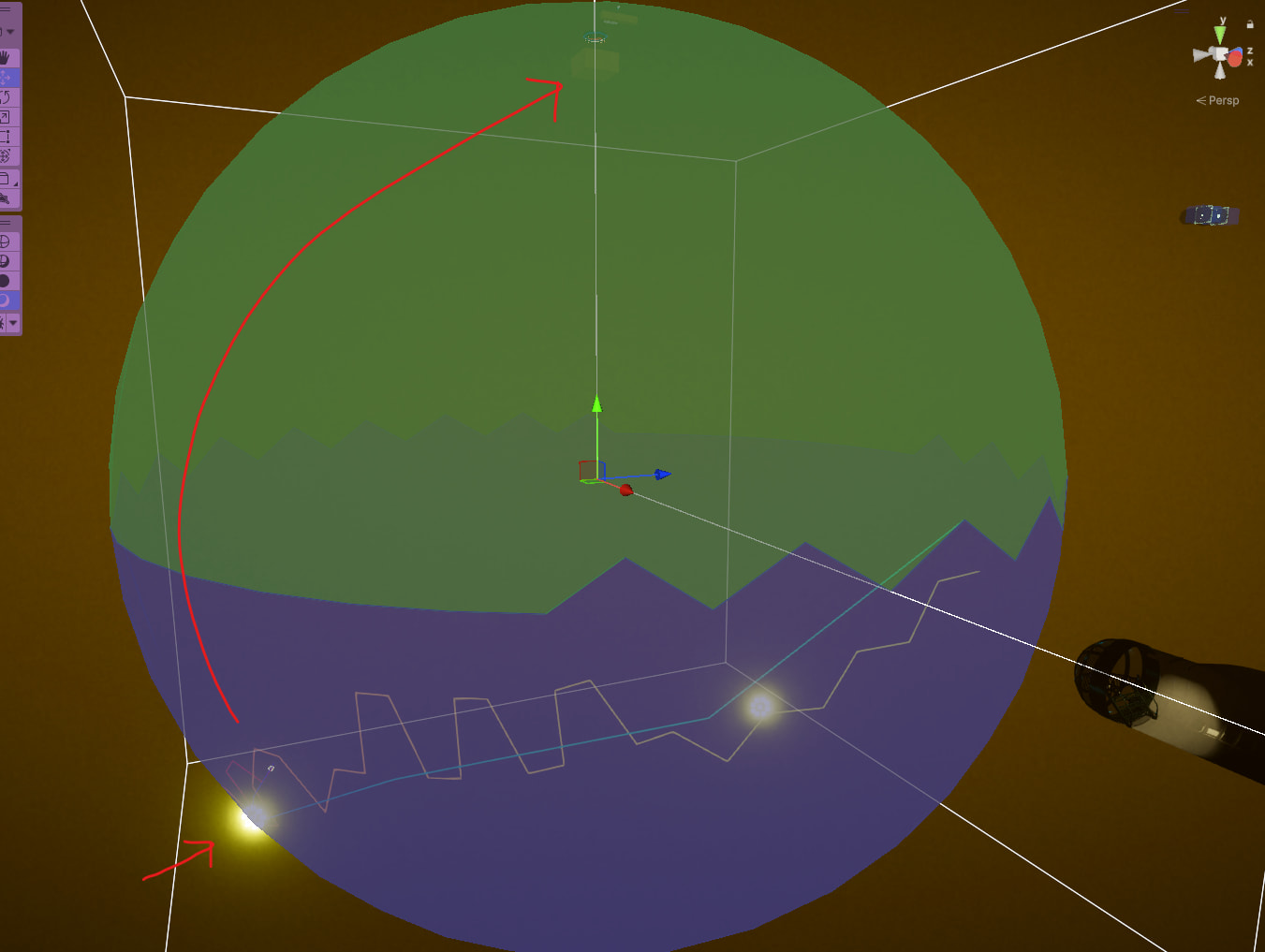
Thanks. Here’s a quick screenshot of the navmesh with areas turned on.
This navmesh was made in Blender. It’s just a completely standard Icosphere with 4 subdivisions, with nothing else changed about it, just to isolate the navigation issues. (I can’t attached FBX files to this post, or I would add it.)
Some context on what’s happening in this screenshot: The small red arrow I drew shows where the Seeker is standing. The large red arrow shows where I’m trying to sent it (the very top of the sphere). The jagged yellow line is the raw path produced by seeker.StartPath. The blue line is the smoothed result of the Funnel modifier on that path.
The important part, as it seems you’ve already deduced, is that the path never crosses the Area boundary. Any time the seeker is in the southern hemisphere, it can never produce a complete path to any point in the north. It always paths to the area boundary, and only once it has passed into the next area does the path actually make it to the final destination.
This would probably be completely fine and unnoticeable if the agent took a good path to the equator. But as you see in the screenshot here, it seems to pick a fairly weird path that has it go half way around the sphere first before heading north. (That red drawn-in arrow more or less shows what a direct path should have looked like.)
Is there a setting to get it to find a more direct route to the area boundary so it doesn’t go so far out of its way to go from south to north?
Hi
There is a recalculate normals field on the navmesh graph that needs to be switched off. Also mentioned in the spherical worlds doc page.
Yes, I’ve always had Recalculate Normals turned off.
Edit: Okay, this is all working now. The problem turned out to be that having “Affected by Navmesh Cuts” checked was causing the sphere to be broken into the two distinct areas. When I uncheck that, the sphere is one single area, and the agent can get efficiently between any two points.
I don’t know if there should be some warning about having that enabled. I know the docs say Cuts don’t work, but it doesn’t specifically say it should be disabled, the way it says that Recalculate Normals should be disabled.
Anyway, seems I’m all set now.
1 Like